

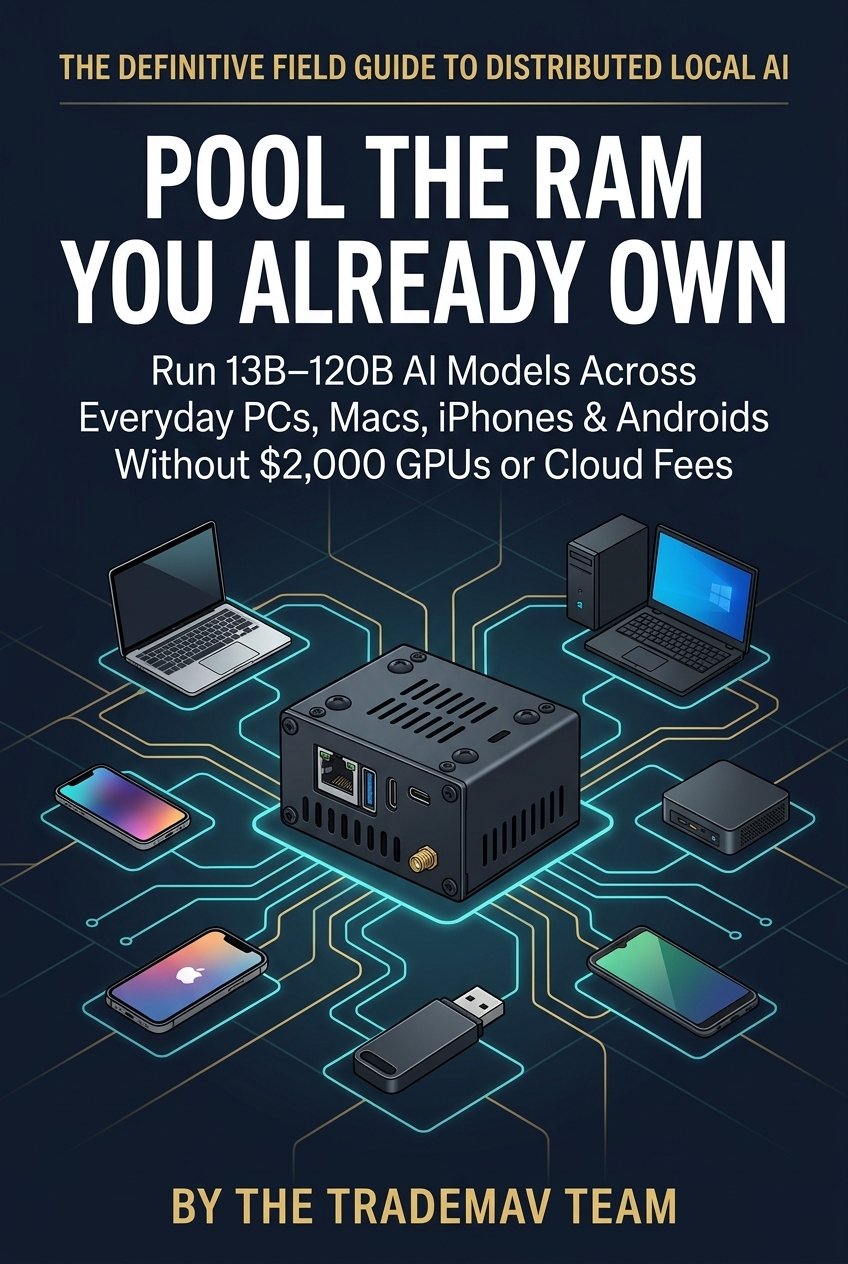
Pool the RAM You Already Own
A Practical Guide to Running Large AI Models Privately Across the Computers and Phones in Your Home
First Edition
Copyright
Copyright © 2026 by TradeMAV. All rights reserved.
Published by TradeMAV Publishing
ISBN: 979-8-16746-277-9 (Paperback)
Official Book & Video Benchmarks: ramdeck.com/book
Official Hardware & Downloads: ramdeck.com
No part of this publication may be reproduced, stored in a retrieval system, or transmitted in any form or by any means—electronic, mechanical, photocopying, recording, or otherwise—without the prior written permission of the publisher, except for brief quotations in reviews, academic citations, or critical articles.
TradeMAV™ is a trademark of TradeMAV. Technology Patent Pending.
Apple, Mac, MacBook, Mac mini, Mac Studio, iPhone, iPad, macOS, iOS, iPadOS, App Store, and Metal are trademarks of Apple Inc., registered in the U.S. and other countries. Android and Google Play are trademarks of Google LLC. Windows is a registered trademark of Microsoft Corporation. Linux is the registered trademark of Linus Torvalds. NVIDIA, GeForce, GTX, RTX, and CUDA are trademarks and/or registered trademarks of NVIDIA Corporation. AMD and Ryzen are trademarks of Advanced Micro Devices, Inc. All other product and company names mentioned herein are trademarks of their respective holders and are used solely for identification.
To our early testers and backers,
who opened their homes and offices to a new way of running AI—
and to the engineers of the TradeMAV team,
who worked tirelessly until five operating systems worked together as one.
Preface
RAMDeck exists because we refused to pay exorbitant monthly cloud fees—and refused to give in to memory scalpers and overpriced hardware—just to scale our own artificial intelligence.
Before we ever considered launching RAMDeck for the public, our team had already built and shipped local hardware and software products (TradeMAV and OptionMAV, which run locally off a USB drive). To support our growing user base, we built an internal local AI assistant—we call it Jarvis—trained on our private technical knowledge base.
At first, Jarvis ran comfortably on a single 16 GB Mac mini in our office. It answered complex technical questions locally while keeping all of our proprietary information inside our own walls.
Then two things happened at once. First, our AI models and document context outgrew a single 16 GB machine. Stepping up to 27-billion, 30-billion, 70-billion, and 120-billion parameter models meant that a single 16 GB computer simply ran out of memory and crashed. Second, the global memory market entered a severe supply crunch that builders now call the “RAMpocalypse.” As hyperscale AI data centers locked up global semiconductor wafer supply for enterprise server memory, consumer DDR5 prices surged—a 64 GB kit that cost around $191 in August 2025 climbed past $1,100 a year later, with industry analysts projecting tight supply through 2027 and 2028.
Look at the two options the tech industry was offering us—and offering you:
- Pay over a thousand dollars to hardware scalpers or spend $3,000 to $5,000 on a brand-new workstation just to put more memory inside a single box.
- Or give up on local ownership altogether, pay monthly cloud subscriptions forever, and upload your private documents, source code, medical questions, and business records to someone else’s corporate server.
We looked around our office and realized how unreasonable that choice was.
Sitting in the room with us was more than 100 GB of paid-for memory—it was simply scattered across everyday machines that most people would consider spare hardware: a 2019 Acer Windows laptop with 12 GB of RAM, a spinning hard drive, and no graphics card; a 2017 Intel MacBook with 12 GB of RAM; an M3 MacBook (16 GB); an M4 Mac mini (16 GB); a Windows 11 Mini PC (32 GB RAM with an RTX 3060); an Ubuntu Linux Mini PC (32 GB RAM); an iPhone 16 (8 GB); an iPhone XS (4 GB); and a Samsung Galaxy S24+.
Instead of buying a larger computer or feeding the scalpers, we pointed the devices we already owned at the same problem and taught them to work together as a single unified pool of memory.
It worked so well—and continues to run models like Qwen across our office cluster today to power Jarvis—that we knew every family, student, developer, clinic, and small business facing inflated memory prices deserved the same capability.
Our Approach
When we decided to turn our internal cluster technology into RAMDeck (ramdeck.com)—a plug-and-play hardware hub ($199 retail; launched at $159 on Indiegogo through November 9, 2026, bundled with the $29 Official RAMDeck Node USB)—we committed to four principles:
- Honest benchmarks on modest hardware. Most tech companies record benchmarks on $10,000 lab rigs and edit out the slow parts. In our public benchmarks (ramdeck.com/blog), we intentionally tested on modest, everyday machines—even making that 2019 Acer laptop with a spinning hard drive and no GPU the primary computer in most runs. When a heavy Qwen 3.8 27B Dense model across the Acer laptop, Mini PC, Mac mini, and Samsung Galaxy S24+ ran at 1.92 tokens per second (Video), we published the unedited video right alongside our 28.0 tokens per second Qwen 30B MoE run across an M3 MacBook and two iPhones (Video) and our 38–39 tokens per second Qwen3-Coder 30B run across the Mini PC and M4 Mac mini (Video). If your only goal is maximum speed on a single machine, buy a $2,000 graphics card. If your goal is running large AI models that cannot fit on any single machine you own—without buying new computers—RAMDeck was built for you.
- Real software before asking for trust. Before launching our campaign, our team completed the engineering work upfront: getting RAMDeck Distributed AI approved on the Apple App Store, getting RAMDeck Node live on the Google Play Store, and filming unedited tests of our “Unplug & Walk” Node USB.
- Complete data privacy. Your medical questions, legal contracts, family conversations, financial records, and proprietary code belong to you. RAMDeck runs entirely inside your local network through your Hub’s local IP address, even with your internet cable unplugged.
- Preventing electronic waste. Every year, millions of functional laptops, desktops, and smartphones are discarded simply because 8 GB or 12 GB of soldered RAM is too small for modern AI workloads alone. Pooling those secondary laptops, desktops, and phones gives working hardware a second life and keeps electronics out of landfills.
Who This Book Is For
We wrote this book for anyone frustrated by surging memory prices and hardware scalpers; anyone who wants to run large local AI models without learning command-line tools; professionals and families who need air-gapped data privacy; and anyone who believes in reusing the computers and phones they already own.
— The TradeMAV Team
Contents
- Part I: The Memory Wall, Privacy, and Hardware Reuse
- Chapter 1: Breaking the Memory Wall
- Chapter 2: The Memory Price Surge and Your Hidden Hardware
- Chapter 3: Three Generations of Local AI
- Part II: How Distributed Local AI Works
- Chapter 4: How Devices Collaborate Over Your Home Network
- Chapter 5: Why Mixture-of-Experts Models Run So Fast
- Part III: Pooling Computers, USB Nodes, and Phones
- Chapter 6: Giving Everyday Computers a Second Life
- Chapter 7: Zero-Install Pooling with the Node USB
- Chapter 8: Pooling iPhones, iPads, and Android Phones
- Part IV: Real-World Blueprints and Quick-Start Guide
- Chapter 9: Five Verified Cluster Blueprints
- Chapter 10: Household Audit, Playbooks, and Quick-Start Guide
- Part V: Reference Appendices
Breaking the Memory Wall
Until recently, running a 30-billion, 70-billion, or 120-billion parameter artificial intelligence model was restricted to corporate cloud data centers and $3,000 workstations.
When an everyday person, student, or small business owner tried to run one of those models at home on a standard 16 GB laptop or desktop PC, the experience almost always ended the same way:
- They installed a local AI program and tested a small 3B or 7B model, which worked well for basic questions.
- Wanting stronger reasoning and coding accuracy, they downloaded a 13B, 27B, 30B, or 70B model and clicked Load.
- Seconds later, the computer’s cooling fans spun to maximum speed, the mouse cursor froze, and the program either crashed with an Out of Memory error or ground to a halt swapping data onto the hard drive.
For years, the hardware industry told consumers that this crash meant their processor was too weak for serious AI, and that the only solution was paying monthly cloud subscriptions forever or buying a brand-new $2,500 to $5,000 workstation.
Both of those claims were wrong.
Your computer’s processor is not why large AI models fail to load. What stops a single 16 GB computer from running data-center-class models is a physical boundary called the Memory Wall—and breaking that boundary for everyday households without requiring new computers or technical skills is why the TradeMAV team created RAMDeck (ramdeck.com).
This chapter explains how language models use memory, how to choose the right open-weight model for your needs, and how the RAMDeck Hub turns the stranded RAM across your existing devices into a single shared memory pool.
Why Models Cannot Run Off a Hard Drive
When you open a 50-gigabyte movie file or a 100-gigabyte video game on a 16 GB laptop, your computer does not run out of memory. Traditional software loads only a small slice of a file into RAM at any given moment while the rest stays parked on your solid-state drive (SSD) until needed.
A Large Language Model (LLM) obeys very different rules.
In a modern neural network, knowledge is stored across billions of numerical weights arranged in sequential layers. To generate even a single word of a reply, the processor must read the active layers of the model out of memory to calculate that word. Then, to generate the second word, it must read those billions of weights out of memory all over again.
Because consumer SSDs are 10 to 50 times slower than physical RAM—and wear out under heavy sustained swap writes—a language model cannot run off your hard drive during generation.
The Golden Rule of Local AI
For any Large Language Model to run at practical speeds without wearing out your hard drive, 100% of its active model weights plus its active conversation memory must reside inside physical RAM or graphics memory (VRAM) at the same time.
Choosing a Model Compression Level
Open-weight models such as Llama, Qwen, Gemma, DeepSeek, Mistral, Phi, and OpenAI gpt-oss are originally trained in data centers using uncompressed 16-bit numbers (FP16), which require roughly 2 GB of RAM for every billion parameters—60 GB for a 30B model, or 140 GB for a 70B model.
Through quantization in the standard GGUF file format—supported natively by RAMDeck—those weights are compressed into 4-bit, 5-bit, or 8-bit formats. This shrinks the memory required by 60% to 75% while preserving over 99% of the model’s reasoning quality.
| GGUF Compression | Bits Per Weight | RAM Per 1B Parameters | Size of a 30B Model | Quality vs. Original | Recommendation |
|---|---|---|---|---|---|
| Q2_K / IQ2_XXS | ~2.6 – 3.0 bits | ~0.35 GB | ~10.5 GB | Noticeable logic loss | Avoid when possible; pool another device to run Q4_K_M instead |
| Q3_K_M | ~3.9 bits | ~0.48 GB | ~14.4 GB | Good for chat; minor coding loss | Useful when fitting a 70B model into a ~36 GB pool |
| Q4_K_M (Sweet Spot) | ~4.8 bits | ~0.60 GB | ~18.0 GB | ~99% fidelity | Primary recommendation for home and office clusters |
| Q5_K_M | ~5.7 bits | ~0.71 GB | ~21.3 GB | ~99.6% fidelity | Great for coding and math when pooled RAM allows |
| Q6_K | ~6.6 bits | ~0.82 GB | ~24.6 GB | Virtually lossless | High-precision legal, medical, and financial analysis |
| Q8_0 | ~8.5 bits | ~1.06 GB | ~31.8 GB | Indistinguishable | Archival quality across 3 to 5 pooled devices |
Sizing Your Memory Pool
When choosing a model for your computer or your RAMDeck cluster, total memory usage comes from three parts:
- Model weights. The size of the GGUF model file itself (for example, about 18 GB for a 30B model in Q4_K_M).
- Conversation context (KV cache). The working memory that holds your conversation history and pasted documents (4K, 8K, 16K, or 32K+ tokens).
- Working buffer. A small scratchpad used while generating replies. Together with an 8,192-token context window, this adds roughly 1.5 GB to 4.5 GB on top of the model file.
| Model Class | Example Models | File Size (Q4_K_M) | Context & Buffer | Minimum Usable RAM | Single 16 GB Laptop | Pooled with RAMDeck |
|---|---|---|---|---|---|---|
| 1B – 4B | Llama-3.2-3B, Qwen2.5-3B | 1.0 – 2.6 GB | +0.8 – 1.2 GB | 2.0 – 3.8 GB | Runs standalone | Runs on any single device |
| 7B – 8B | Qwen2.5-Coder-7B, Llama-3.1-8B | 4.7 – 5.4 GB | +1.2 – 1.8 GB | 6.0 – 7.2 GB | Fits on 16 GB (Crashes on 8 GB) | 43–44 tok/s across Acer + Mini PC + Mac (Video) |
| 13B – 14B | Qwen3.5-13B, Phi-4-14B | 8.2 – 9.5 GB | +1.8 – 2.5 GB | 10.0 – 12.0 GB | Tight on 16 GB | 11–19 tok/s across 3 PCs + Galaxy S24+ (Video) |
| 27B – 32B | Qwen 3.8 27B, Qwen 30B MoE | 16.5 – 19.5 GB | +2.0 – 3.5 GB | 18.5 – 23.0 GB | Crashes (Out of Memory) | 28–39 tok/s (30B MoE) & 1.92 tok/s (27B Dense) (Video) |
| 40B – 72B | Qwen3-Coder-Next 40B, Llama-3.3-70B | 25.0 – 43.5 GB | +3.0 – 6.5 GB | 28.0 – 50.0 GB | Impossible | 16 tok/s on 40B MoE (Video) & unlocks 70B+ |
| 120B+ | gpt-oss 120B | 60.0 – 74.0 GB | +6.0 – 10.0 GB | 66.0 – 84.0 GB | Impossible | 3.1 tok/s (5 PCs) (Video) & 1.37 tok/s (Video) |
The Operating System Reserve
Why does a 16 GB laptop fail to load an 18.5 GB AI workload? Because every operating system—Windows, macOS, Linux, iOS, and Android—keeps a portion of physical RAM reserved so your screen, Wi-Fi, and everyday apps stay responsive. On a typical 16 GB laptop, that leaves roughly 10 GB to 11 GB of free memory available for AI.
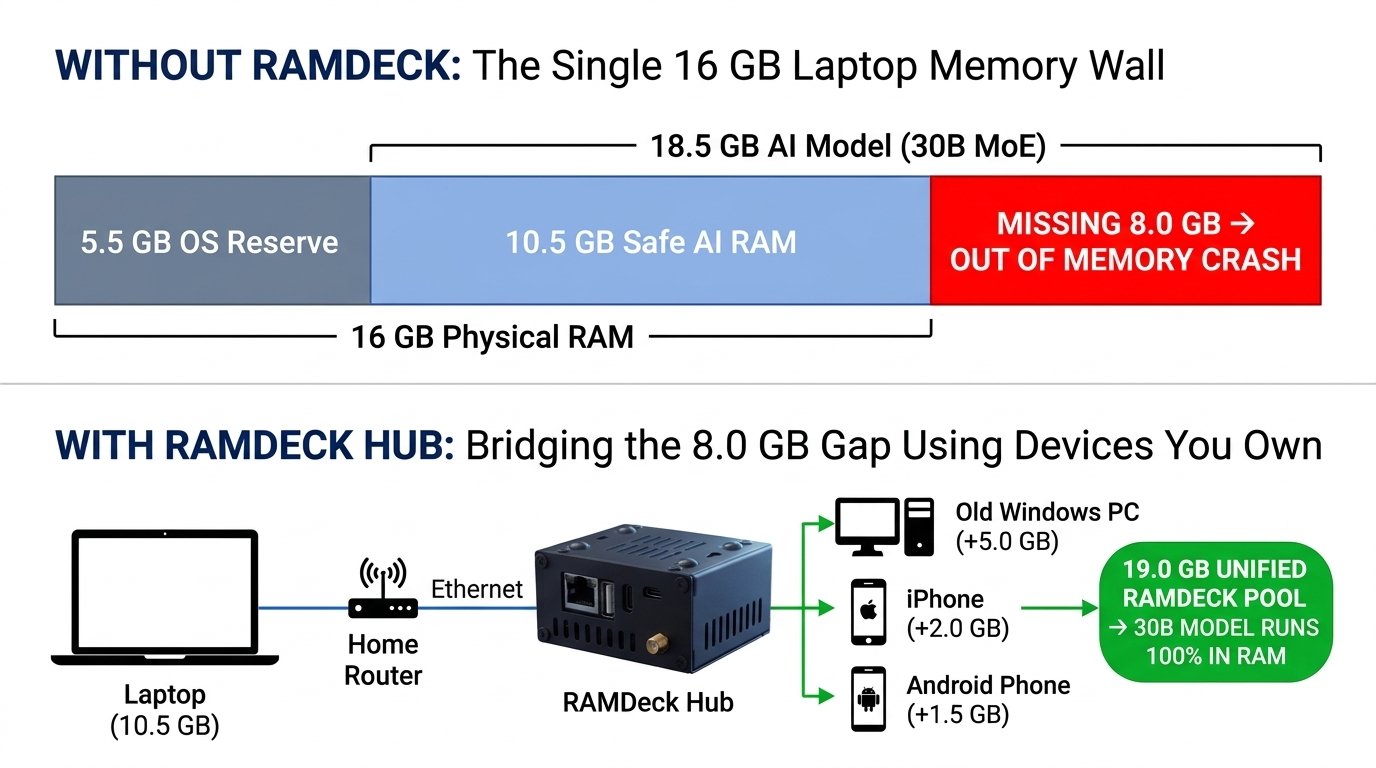
As Figure 1.1 illustrates, your 16 GB laptop does not need to be replaced with a $2,500 workstation. It already has more than 10 GB of fast memory paid for—you are only short by 7 GB to 8 GB to run a 27B or 30B model. By plugging the $199 RAMDeck Hub ($159 during the Indiegogo campaign through November 9, 2026) into your home router, you bridge that remaining gap in 60 seconds using the secondary laptops, desktops, iPhones, and Android phones already in your home.
Key Takeaways
- The Memory Wall. Large AI models crash on consumer laptops not because the processor is slow, but because 100% of the compressed model weights and conversation context must fit inside physical RAM or VRAM simultaneously.
- The 0.60 GB Rule. At the recommended Q4_K_M quality level, a model needs roughly 0.60 GB per billion parameters plus 1.5 to 4.5 GB for context—meaning 27B to 120B models (18.5 GB to 84 GB) cannot fit on a single 16 GB computer.
- Bridging the gap. RAMDeck pools the idle memory across your existing Windows, Mac, Linux, iOS, and Android devices so everyday households can run large models without buying new computers.
The Memory Price Surge and Your Hidden Hardware
Between 2025 and 2027, the economics of buying computer memory turned upside down in what hardware analysts and PC builders call the “RAMpocalypse.”
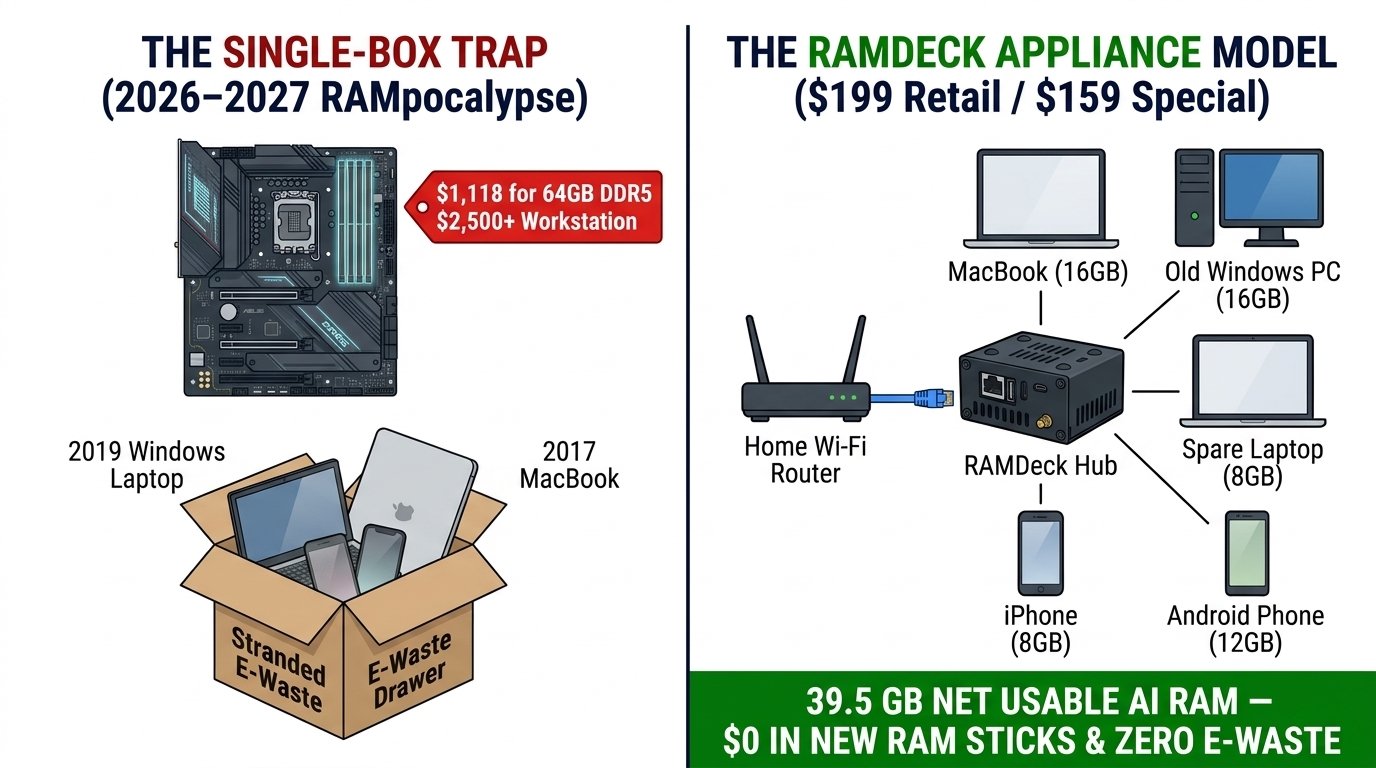
Consumers, students, and small business owners looking to buy 64 GB or 128 GB DDR5 RAM kits, high-VRAM graphics cards, or factory memory upgrades on laptops ran into a severe global memory shortage compounded by hardware scalpers. A standard 64 GB DDR5 kit that cost around $191 in August 2025 climbed to $1,118 a year later, with industry supply trackers projecting tight supply through 2027 and 2028.
In the middle of this hardware crunch, RAMDeck (ramdeck.com) introduced a more practical and sustainable approach to local AI: instead of paying scalpers for overpriced memory sticks inside a single box, pool the 48 GB to 96 GB of RAM already sitting across the secondary computers and phones in your home.
Why Consumer Memory Prices Spiked
Three semiconductor manufacturers—Samsung, SK Hynix, and Micron—produce more than 90% of the world’s dynamic random-access memory (DRAM).
To supply massive cloud AI data centers, those manufacturers shifted a large share of their silicon wafer capacity away from consumer DDR4 and DDR5 memory toward enterprise High-Bandwidth Memory (HBM3e and HBM4). Because enterprise HBM chips are stacked vertically in complex multi-layer towers, producing a single gigabyte of enterprise HBM consumes roughly three times the wafer capacity of standard consumer DDR5 RAM.
At the same time, factories began phasing out older DDR4 production lines. The result for everyday buyers has been a painful squeeze: data centers absorbed the wafer supply to build server chips that rent AI back to the public for $20 to $200 a month, while consumers were priced out of upgrading their own PCs to run those models privately at home.
Why Gaming PC Workarounds Fail for AI
When people look for ways around high memory prices, PC-building guides usually suggest five workarounds meant for video games. Unfortunately, all five fall short when running Large Language Models:
| Conventional Gaming Advice | Works for Games? | Why It Fails for 27B–120B AI Models | How RAMDeck Solves It |
|---|---|---|---|
| Buy one 16 GB stick now and add a second in 2028 | Barely | 16 GB leaves only ~10.5 GB usable, and single-channel mode cuts memory speed in half. | Keep dual-channel intact and pool extra RAM across your other laptops and phones. |
| Fall back to an older DDR4 motherboard | Yes | Still limits you to one computer’s physical slots at lower bandwidth. | Pools your existing DDR4 and DDR5 computers together without buying a motherboard. |
| Upgrade your GPU instead of buying RAM | Yes | Sub-$1,000 GPUs carry only 8–16 GB of VRAM; a 20 GB+ model still crashes. | Combines your GPU’s fast VRAM with the system RAM of every other device on your LAN. |
| Buy a prebuilt PC or laptop | Sometimes | Most ship with 16 GB of RAM that still cannot load a 30B or 70B model alone. | Connects that 16 GB laptop to your Hub and expands its usable AI memory to 30–80 GB+. |
| Buy used DDR4 sticks | Desktops only | Modern MacBooks, Mac minis, laptops, iPads, and phones have soldered RAM. | Expands the usable AI memory of soldered Macs, laptops, iPhones, and Androids over your network. |
Cost Comparison
Here is how the cost of unlocking 32 GB to 80 GB+ of usable local AI memory compares across available options:
| Approach | Purchase Required | Typical Cost | Works with Soldered Laptops & Phones? | Setup Experience |
|---|---|---|---|---|
| Single High-Memory Workstation | New 64–128 GB workstation | $2,400 – $5,000+ | No (Leaves existing devices unused) | Full computer replacement |
| Single-Desktop Overhaul | Motherboard, 64–96 GB DDR5, GPU | $900 – $2,200+ | No (Desktop towers only) | Hardware teardown and rebuild |
| RAMDeck Distributed AI Hub | 1 RAMDeck Hub (Includes Official Node USB) | $199 Retail ($159 Indiegogo Special through Nov 9, 2026) | Yes (Windows, macOS, Linux, iOS, Android) | 60 seconds: plug Hub into router, run USB or mobile app |
| Open-Source Command-Line Tools | None | $0 software (Developer time) | Desktop command line only | Manual terminal setup for programmers |
A Typical Household Memory Audit
To see how much memory is already hiding in an average home, look at the devices in a household that thinks it “only has a 16 GB laptop”:
| Existing Household Device | Physical Memory | System Reserve | Usable AI RAM Unlocked | Connection Method |
|---|---|---|---|---|
| Main Work Laptop (M3 MacBook, 16 GB) | 16.0 GB | ~5.0 GB | +11.0 GB | Native macOS Node or Node USB |
| Secondary Desktop (Windows 11, 16 GB RAM + 8 GB RTX GPU) | 16.0 GB RAM + 8.0 GB VRAM | ~5.5 GB | +7.0 GB VRAM + 10.5 GB RAM | Official Node USB |
| Spare Laptop (Windows or Linux, 8 GB) | 8.0 GB | ~3.5 GB | +4.5 GB | Official Node USB |
| Primary Phone (iPhone 16, 8 GB) | 8.0 GB | ~5.5 GB | +2.5 GB | Apple App Store App |
| Secondary Phone (Samsung Galaxy S24+, 12 GB) | 12.0 GB | ~8.0 GB | +4.0 GB | Google Play Store App |
| Total Pooled Capacity | 68.0 GB Physical | ~27.5 GB Reserve | 39.5 GB Usable AI Memory | Unified at RAMDeck Hub LAN IP |
Standing alone, none of those devices can load a 27B or 30B model. Connected through the RAMDeck Hub, that same household commands 39.5 GB of usable AI memory in 60 seconds.
Preventing Electronic Waste
Beyond saving money and bypassing hardware scalpers, network memory pooling addresses one of the largest environmental problems in modern technology: premature electronic waste driven by soldered memory limits.
Manufacturing a single new laptop or desktop consumes hundreds of kilograms of raw earth minerals, thousands of liters of water, and 200 to 400 kg of embodied carbon emissions before the box ever reaches your door. Yet millions of working laptops, desktops, and smartphones are relegated to closets or recycling bins simply because their 8 GB, 12 GB, or 16 GB of soldered RAM cannot fit today’s larger AI workloads alone.
With RAMDeck, a 2017 Intel MacBook with 12 GB of RAM or a 2019 Windows laptop with 12 GB of RAM and a spinning hard drive no longer needs to be discarded as e-waste—it contributes 6 GB to 8 GB of vital memory that helps your household run a 30B or 70B model. Likewise, a secondary 4 GB iPhone XS or 6 GB Android phone in a drawer becomes a silent, low-power wireless memory node. Every gigabyte of RAM you pool is a gigabyte of newly mined silicon you didn’t have to buy, and a working computer kept in productive service.
Key Takeaways
- The 2026–2027 memory crunch. Data-center HBM demand and scalping drove 64 GB DDR5 kits from $191 to over $1,100, and soldered laptops, Macs, and phones cannot accept RAM sticks anyway.
- Hidden household capacity. Most homes and small offices already own 40 GB to 90 GB+ of memory scattered across existing laptops, desktops, and phones.
- Economic and environmental value. For $199 retail ($159 on Indiegogo through November 9, 2026, including the $29 Node USB), RAMDeck unifies those existing devices while keeping working computers out of landfills.
Three Generations of Local AI
Every major computing technology passes through three stages before moving out of research labs and into everyday homes:
- Home networking. In the 1990s, only corporate offices had local networks (Generation 1). Next, technical hobbyists wired homes using command-line scripts and manual network settings (Generation 2). Finally, plug-and-play Wi-Fi routers turned home networking into a 60-second consumer appliance (Generation 3).
- Shared network storage. First, multi-terabyte storage arrays were restricted to server rooms (Generation 1). Next, hobbyists maintained command-line Linux file servers (Generation 2). Finally, plug-and-play Network Attached Storage (NAS) boxes let any family or small office plug a storage appliance into their router (Generation 3).
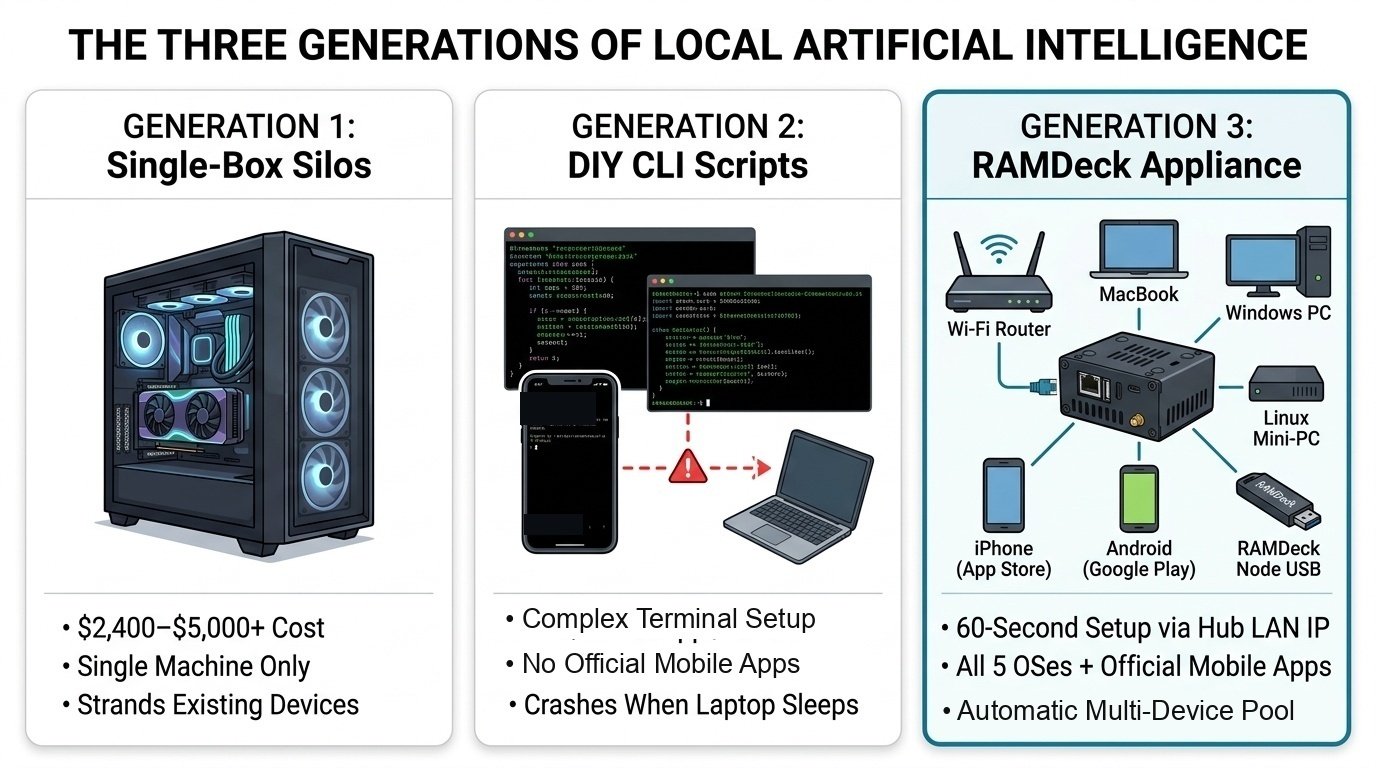
Today, local artificial intelligence is entering Generation 3—moving out of the command-line terminal and into a plug-and-play router appliance for everyday homes and offices.
Generation 1: Single-Machine Workstations
In Generation 1, the only way to run a large AI model locally was buying a single workstation large enough to hold the entire model inside one enclosure—such as a custom dual-GPU PC tower ($3,000+) or a high-memory Mac Studio ($2,400 to $5,500+).
While effective for enterprise studios, Generation 1 locked out most households and small offices. Few students, families, or independent professionals want to spend $3,000 on a single computer just for AI—especially while their existing 16 GB laptops, office PCs, iPhones, and Android phones sit idle. And once a new model outgrows a soldered workstation’s memory, you cannot add a RAM stick; you have to replace the entire machine.
Generation 2: Single-Machine Sharing and DIY Developer Tools
Before a true plug-and-play consumer appliance existed, anyone trying to use multiple devices for local AI ran into a frustrating divide between single-machine sharing and developer command-line frameworks:
- Option A: Centralized Single-Machine Sharing (Ollama). Tools like Ollama make it easy to run a model on one strong computer and access its chat window from other laptops or phones over local Wi-Fi. The catch: centralized sharing does not combine RAM across your devices. Your model size is still strictly limited to whatever memory fits inside that single main machine. If an 18 GB or 42 GB model cannot fit inside your primary computer alone, centralized sharing cannot load it.
- Option B: Developer Command-Line Frameworks (Exo and llama.cpp RPC). To actually combine memory across multiple machines (true distributed inference), programmers created open-source developer frameworks such as Exo and llama.cpp RPC mode. While valuable for software engineers, they come with steep practical hurdles for everyday households and offices:
- Exo is built primarily around macOS (Apple Silicon) and Linux. It does not offer a native Windows desktop installer (requiring Linux containers or WSL workarounds), mobile support is experimental rather than delivered through standard App Store or Google Play apps, and every machine must match exact software versions in the terminal or nodes drop out.
- llama.cpp RPC mode runs across Windows, macOS, and Linux, but requires manually launching terminal servers and typing command-line flags with IP addresses and port numbers across each machine. There is no click-and-play app interface, no dedicated router hub, no zero-install portable USB workflow, and no official iPhone or Android app store client.
Generation 3: The Plug-and-Play Network RAM Appliance
The TradeMAV team created RAMDeck (ramdeck.com) to solve that exact gap—delivering true multi-device RAM pooling with a click-and-play interface, native support across all five operating systems, and zero terminal commands.
Instead of asking users to open terminal windows or settle for single-machine sharing, RAMDeck packages distributed AI into a dedicated hardware hub ($199 retail; $159 Indiegogo special through November 9, 2026) that plugs directly into your home or office router via Ethernet.
| Feature | Single-Machine Sharing (Ollama) | DIY Developer Frameworks (Exo / CLI RPC) | RAMDeck Hub & App Ecosystem |
|---|---|---|---|
| Combines RAM Across Devices? | No (Limited to 1 machine’s RAM) | Yes (Via developer CLI setup) | Yes (True multi-device RAM pooling) |
| Click-and-Play Interface? | Desktop app (Single machine only) | No (Requires terminal commands) | Yes (60-second web dashboard & apps) |
| Native Windows 10/11 Support | Yes (Single machine) | No native installer in Exo; manual CLI in RPC | Native 1-Click Installer + Zero-Install USB |
| macOS & Linux Support | Yes (Single machine) | Yes (Via terminal setup) | Native 1-Click Installer + Zero-Install USB |
| iPhone & iPad (iOS/iPadOS) | Chat viewer only (Pools 0 GB RAM) | Experimental / no App Store client | Official Apple App Store App |
| Android Phones & Tablets | Chat viewer only (Pools 0 GB RAM) | Experimental / requires manual terminal setup | Official Google Play Store App |
| Zero-Install USB Mode | No | No | Yes: 1 USB stick activates multiple PCs (0 bytes on disk) |
| Cluster Brain | Main PC must stay awake | Terminal window on a PC | Dedicated 24/7 hardware hub on your router |
| Wi-Fi Speed on 30B Models | Crashes on 16 GB laptop | Often bottlenecked on Dense models | 28 to 39 tokens/sec on 30B MoE models |
What Makes RAMDeck Plug-and-Play
RAMDeck was designed so anyone can pool memory across their devices in 60 seconds with zero coding and zero terminal commands:
- The dedicated router hub. A silent, always-on hardware appliance plugged into your router that connects your devices through its local IP address and hosts your private web dashboard (for example, http://192.168.1.50:8420).
- Automatic memory safety. RAMDeck automatically manages memory across Windows, macOS, Linux, iOS, and Android so your computers and phones stay smooth and responsive for everyday use.
- The “Unplug & Walk” Node USB. A zero-install USB drive that lets one physical USB stick activate multiple Windows, Mac, and Linux computers sequentially—leaving 0 bytes on their hard drives when stopped.
- Official App Store and Google Play apps. Approved mobile apps that let anyone add iPhones, iPads, and Android phones over Wi-Fi in 15 seconds.
Key Takeaways
- Generation 1 ($2,400–$5,000+ workstations) priced everyday people out of 30B–120B local AI while leaving existing household devices unused.
- Generation 2 (DIY command-line tools) served programmers comfortable configuring developer environments in terminal windows.
- Generation 3 (RAMDeck) delivers a 60-second, plug-and-play hardware hub and app ecosystem for everyone.
How Devices Collaborate Over Your Home Network
When people first hear that the RAMDeck Hub (ramdeck.com) can run a 30-billion or 120-billion parameter AI model across everyday laptops, desktops, iPhones, and Android phones over a standard home router, their first question is almost always about network speed:
“A computer’s internal RAM is fast, whereas my home router uses standard Ethernet and Wi-Fi. How can a massive AI model run across my home network without bogging down my Wi-Fi?”
That question goes straight to the heart of how distributed AI works. If your computers had to transmit 18 GB or 70 GB of model files back and forth across your Wi-Fi router for every single word, running a model across a home network would indeed be impossible.
Here is the principle that allows RAMDeck to pool memory across an ordinary home or office router with ease:
Stationary Weights, Moving Signals
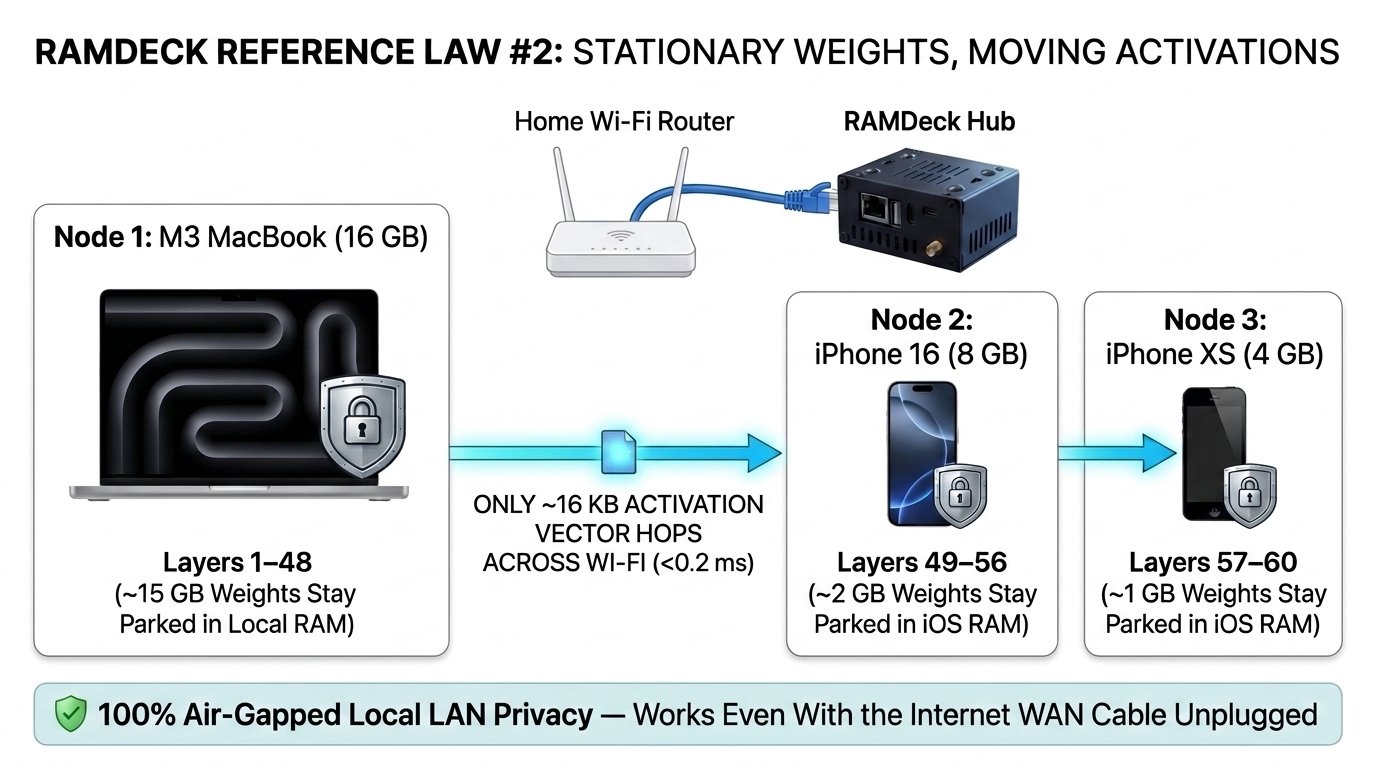
Inside a RAMDeck cluster, the multi-gigabyte model slices never move across your network during generation. Once your RAMDeck Hub assigns a slice of the model to each connected computer or phone, those gigabytes of weights stay parked inside each device’s fast internal RAM. What travels across your router on each generated word is only a tiny mathematical handoff signal—typically just a few kilobytes (8 KB to 64 KB) per hop.
The Assembly-Line Analogy
Every modern Large Language Model (Llama, Qwen, Gemma, DeepSeek, Mistral, Phi, OpenAI gpt-oss) is built like a sequential assembly line of layers—typically 32 to 80 layers depending on the model size.
Think of an 18 GB model as a 60-station assembly line:
- When you try to fit all 60 stations inside a single 16 GB laptop (~11 GB of free RAM after operating system overhead), only Stations 1 through 40 fit inside the building. Without Stations 41 through 60, the model fails to load.
- When you connect that laptop and two iPhones (or a second PC) to your RAMDeck Hub’s LAN IP address, the Hub automatically divides the assembly line across your devices:
- Device 1 (16 GB M3 MacBook). Holds the first large section of the assembly line (~14 GB) inside its internal RAM.
- Device 2 (iPhone 16). Holds the next section (~2 GB) inside its internal RAM.
- Device 3 (iPhone XS). Holds the final section (~1 GB) inside its internal RAM.
Now look at what happens when the model generates a word:
- Your MacBook processes its local layers using its own internal memory, then hands off a tiny 16-kilobyte progress slip over your router to your iPhone 16.
- Your iPhone 16 processes its local layers and hands off a 16-kilobyte progress slip to the iPhone XS, which completes the word.
Sending a 16-kilobyte message across a standard home router takes less than a millisecond—smaller than loading a single tiny website icon.
Reading Your Prompt vs. Writing the Answer
Whenever you send a question or document to your RAMDeck cluster (for example, at http://192.168.1.50:8420), two steps happen in sequence:
- Reading your prompt. When you paste a long document, contract, or code file into the chat window, your cluster first reads your input to build the conversation context before writing the first word of the reply.
- Streaming the answer. Once the first word appears, your cluster streams out the reply word by word (measured in tokens per second). As Chapter 5 explains, streaming speed depends on whether you choose a Mixture-of-Experts (MoE) model (28 to 39 tokens per second on 30B–35B MoE models) or a heavy Dense model (1.92 to 19 tokens per second depending on size and hardware).
Why a Dedicated Router Hub Matters
Why did the TradeMAV team design RAMDeck around a dedicated hardware appliance ($199 retail; $159 Indiegogo special through November 9, 2026) that plugs directly into your router via Ethernet, rather than releasing another desktop script?
- Always-on 24/7 availability. The RAMDeck Hub sits quietly beside your router drawing just a few watts of USB-C power—giving every device in your building a permanent LAN IP address (such as http://192.168.1.50:8420) to connect to at any time, even when individual laptops are closed or asleep.
- Wired Ethernet reliability. Because the Hub connects directly to your router’s Ethernet port via the included cable, it gives your cluster a stable wired anchor on your local network.
- Automatic coordination. When you connect a new Windows PC, Mac, Linux machine, iPhone, or Android phone—or if someone walks out of the house with their phone—the Hub manages your memory pool automatically without manual reconfiguration.
- Air-gapped local privacy. When you use a cloud AI subscription, every medical symptom you ask about, every legal contract or tax return you summarize, every private family question, and every line of source code is sent across the public internet to an external data center. With RAMDeck, all communication stays strictly inside your local home or office network. You can physically unplug your router’s outside internet cable from the wall, and your RAMDeck cluster continues running 13B, 27B, 30B, 70B, and 120B models at full capacity.
Key Takeaways
- Stationary weights, moving signals. Multi-gigabyte model slices stay parked inside each device’s local RAM; only tiny kilobyte-sized signals cross your router as each word is generated.
- The router hub advantage. Plugging the RAMDeck Hub into your router via Ethernet creates a permanent, plug-and-play coordination point across all five operating systems.
- Complete offline privacy. Everything runs over your local LAN IP address inside your walls, working 100% offline even with the outside internet unplugged.
Why Mixture-of-Experts Models Run So Fast
One of the most interesting discoveries for new RAMDeck (ramdeck.com) users happens when they compare two 27B–30B parameter AI models on the same household cluster:
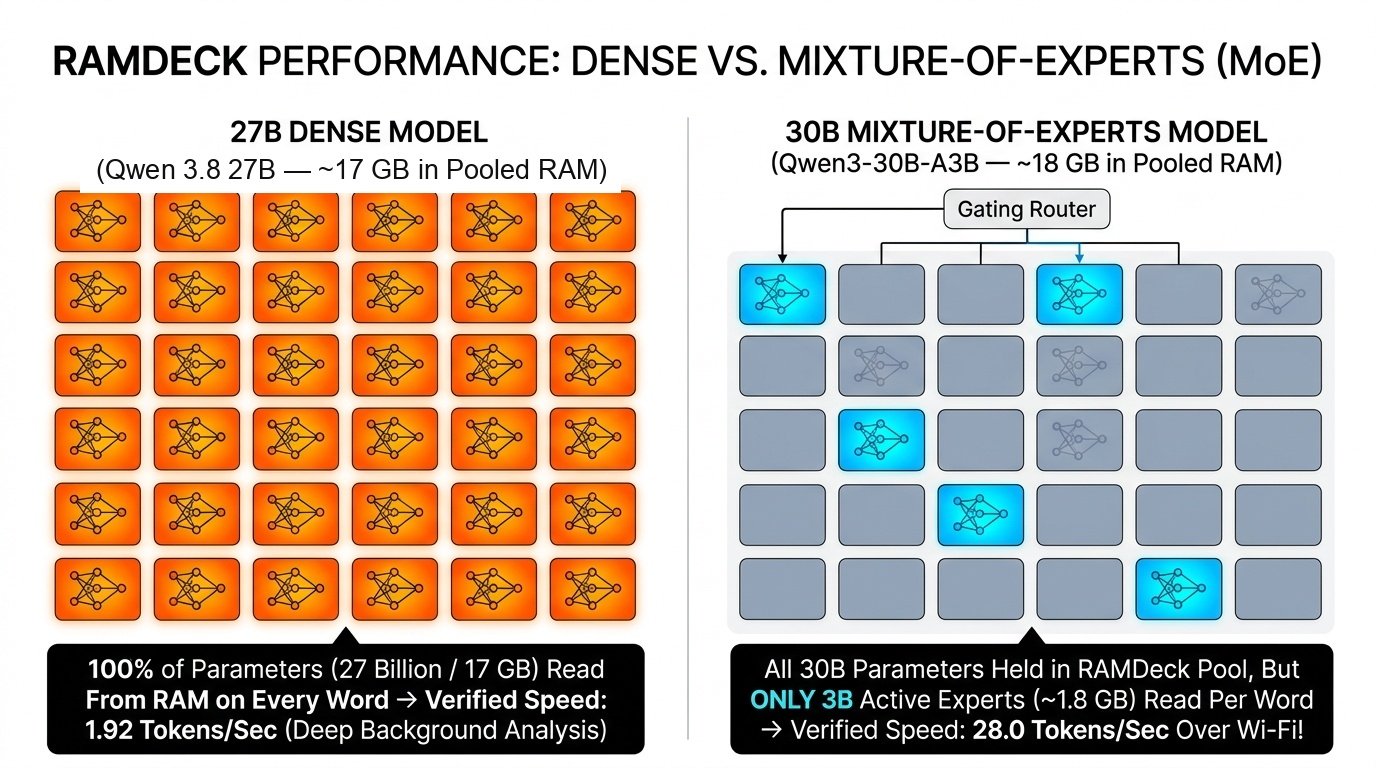
- First, they load Qwen 3.8 27B, a 27-billion-parameter Dense model (~16–17 GB footprint), across our 2019 Acer laptop (acting as primary), Windows Mini PC, Mac mini, and Samsung Galaxy S24+ Android phone connected to the RAMDeck Hub. It runs reliably without crashing at 1.92 tokens per second (Watch Video).
- Next, they load Qwen 30B (A3B), a 30-billion-parameter Mixture-of-Experts (MoE) model (~18 GB footprint), across an M3 MacBook (16 GB) and two iPhones (iPhone 16 and iPhone XS) over standard home Wi-Fi. Text streams across the screen at 28.0 tokens per second (Watch Video)—and when sharded across the RTX 3060 Mini PC and M4 Mac mini, Qwen3-Coder 30B (A3B) reaches 38 to 39 tokens per second (Watch Video).
Notice what those two runs have in common: both models sit in the 27B–30B parameter tier (~17 to 18 GB of weights), and neither model can load on a single 16 GB laptop alone. Yet once pooled with RAMDeck, the 30B MoE model runs at 28 to 39 tokens per second while the 27B Dense model runs at 1.92 tokens per second.
This chapter explains the difference between Dense and Mixture-of-Experts models, and how to pick the right one for each task.
How Dense Models Work
In a traditional Dense AI model—such as Qwen2.5-Coder 7B, Qwen3.5 13B, or Qwen 3.8 27B—100% of the model’s parameters fire on every single word generated.
Here is how Dense models perform across our verified RAMDeck benchmarks:
- 7B Dense (Qwen2.5-Coder 7B across Acer + Mini PC + Mac). Even with the 2019 Acer laptop (no GPU) acting as primary and a Mac coding from another room, pooling the Mini PC’s GPU delivers 43 to 44 tokens per second (Watch Video).
- 13B Dense (Qwen3.5 13B across Acer + Mini PC + Mac mini, plus Galaxy S24+). Across the three computers, the 13B Dense model streams at 11 to 14 tokens per second, reaching 19 tokens per second (Watch Video). With the Samsung Galaxy S24+ Android phone added over Wi-Fi, it runs smoothly at 11 to 14 tokens per second (Watch Video)—roughly three times average human reading speed.
- 27B Dense (Qwen 3.8 27B across Acer + Mini PC + Mac mini + Galaxy S24+). Because every word requires reading all 16–17 GB of dense weights out of memory across four devices, it generates at 1.92 tokens per second (Watch Video). On any single one of those computers alone, the 27B model crashes immediately. Pooled on RAMDeck, you can submit a complex legal contract, research paper, or codebase audit for deep analysis, step away for a cup of coffee, and return to a finished, completely private result.
Why Mixture-of-Experts Changes the Game
To give AI models massive knowledge capacity (30B to 120B+ parameters) without forcing processors to read 100% of memory on every word, modern AI labs (Qwen, DeepSeek, Mistral, OpenAI) created Mixture-of-Experts (MoE) models—such as Qwen 30B (A3B), Qwen3-Coder-Next 40B, and OpenAI gpt-oss 120B.
Instead of using one giant block in every layer, an MoE model organizes its knowledge into a team of specialized experts—for example, a coding specialist, a math specialist, a medical specialist, and a writing specialist.
Look at how Qwen 30B (A3B)—which has 30 billion total parameters, but only 3 billion active parameters per word—works with your RAMDeck Hub:
- Why it still needs pooled memory to load. Because the model does not know in advance which specialist experts your next sentence will call upon, all 30 billion parameters (~17–18 GB in Q4_K_M) must stay loaded inside physical RAM at the same time. A single 16 GB laptop (~10.5–11 GB free RAM) cannot hold the model alone, so RAMDeck pools the missing memory from your phones or a second computer.
- Why it streams at 28 to 39 tokens per second once loaded. Once RAMDeck holds the full 18 GB model in pooled memory across your devices, the model wakes up only 3 billion parameters (10% of the model) on each word. Instead of reading 18 GB of weights per word, your devices read only about 1.8 GB of active specialist weights per word—cutting the memory workload by 90%.
Verified Benchmark Reference Table
Every benchmark below was recorded on our real consumer hardware test bench connected to a RAMDeck Hub over a standard local network, with unedited YouTube video verification:
| Model Loaded | Architecture | Devices Pooled via RAMDeck Hub | Verified Speed | Unedited Video |
|---|---|---|---|---|
| Qwen2.5-Coder 7B | Dense (7B Active) | Acer Laptop (Primary) + Mini PC GPU + Mac | 43 – 44 tok/s | Watch Video |
| Qwen3-Coder 30B (A3B, ~17GB) | Sparse MoE (30B / 3B Active) | Windows Mini PC (RTX 3060) + M4 Mac mini | 38 – 39 tok/s | Watch Video |
| Qwen 35B (Q5, ~26GB) | Sparse MoE | Windows Mini PC (RTX 3060) + M4 Mac mini | ~29 tok/s | Watch Video |
| Qwen 30B (~18GB, Multi-iPhone) | Sparse MoE (30B / 3B Active) | M3 MacBook (~14GB) + iPhone 16 (2GB) + iPhone XS (1GB) | 28.0 tok/s | Watch Video |
| Qwen3-Coder-Next REAP 40B (25+ GB) | Sparse MoE (40B / 3B Active) | Windows Mini PC (Primary) + M4 Mac mini + Acer Laptop | 16.0 tok/s | Watch Video |
| Qwen3.5 13B | Dense (13B Active) | Acer Laptop + Windows Mini PC + M4 Mac mini | 11 – 19 tok/s | Watch Video |
| Qwen3.5 13B + Android Phone | Dense (13B Active) | Acer Laptop + Mini PC + Mac mini + Galaxy S24+ on Wi-Fi | 11 – 14 tok/s | Watch Video |
| 120B Model (60+ GB, 5-PC Multi-OS) | Frontier MoE (120B Total) | 2 Macs + 2 Windows PCs + 1 Ubuntu Linux Mini PC | 3.1 tok/s | Watch Video |
| Qwen 3.8 27B | Dense (27B Active) | Acer Laptop (Primary) + Mini PC + Mac mini + Galaxy S24+ | 1.92 tok/s | Watch Video |
| gpt-oss 120B (60+ GB) | Frontier MoE (~117B / 5.1B Active) | 6 Household Devices Joined (5 Holding Layers) | 1.37 tok/s | Watch Video |
Key Takeaways
- Why MoE and RAMDeck fit together naturally. Mixture-of-Experts models require large total RAM (18 GB to 75 GB+) that only network memory pooling can provide on consumer hardware, while activating only ~10% of their weights per word for fast generation (28 to 39 tok/s).
- Choosing the right model for the task. Choose 30B–40B MoE (16–39 tok/s) or 7B–13B Dense (11–44 tok/s) for interactive chat and coding; choose 27B Dense, 70B Dense, or 120B when you want deep offline document analysis and research.
Giving Everyday Computers a Second Life
Walk through almost any home, apartment, dorm, or small office, and you will find secondary desktop and laptop computers sitting idle:
- A 2019 Acer or Dell Windows laptop with 12 GB of RAM, a spinning mechanical hard drive, and no dedicated graphics card,
- A 2017 Intel MacBook with 12 GB of RAM,
- A Windows 10 or Windows 11 desktop or mini-PC with 8 GB to 32 GB of DDR4 RAM,
- A gaming PC with 16 GB or 32 GB of system RAM and an NVIDIA GeForce RTX 3060 graphics card, or
- A quiet Ubuntu Linux mini-PC sitting in a home office.
In fact, that exact list of everyday machines is the test bench we used at TradeMAV to benchmark RAMDeck (ramdeck.com/blog)—even making the 2019 Acer laptop with a spinning hard drive and no GPU the primary node in most of our runs to prove that RAMDeck works on modest hardware people already own.
Without RAMDeck (ramdeck.com), those secondary computers sit unused for AI because none of them can hold a modern 20 GB to 70 GB model alone—often leading people to discard working electronics as e-waste. With the $199 RAMDeck Hub ($159 Indiegogo special through November 9, 2026), each of those spare computers gets a productive second life as a memory donor node, contributing its DDR4/DDR5 RAM and GPU VRAM to your household cluster in 60 seconds.
Combining Three Types of Computers
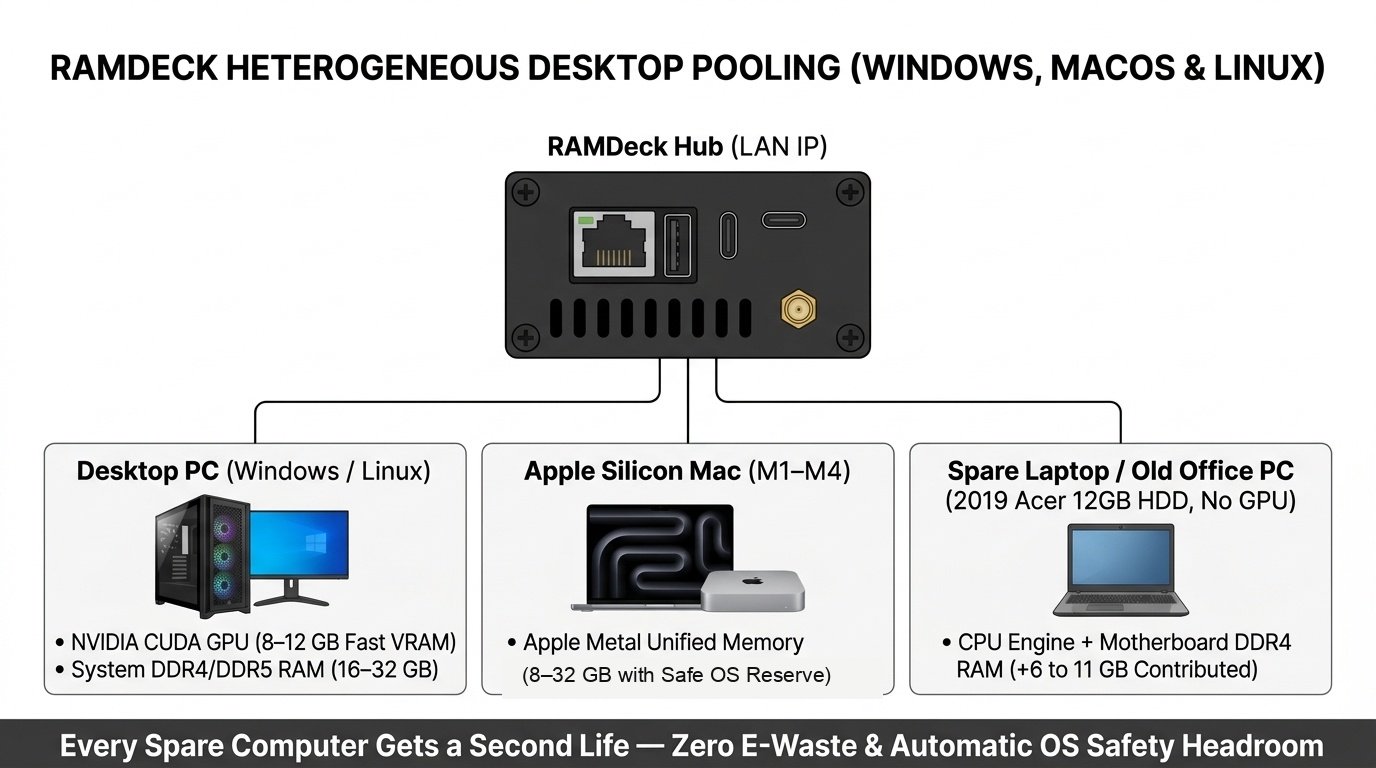
RAMDeck is built for mixed household and office hardware, allowing you to combine three different types of desktop and laptop computers inside the same cluster:
- Windows and Linux PCs with NVIDIA graphics cards. When you launch the RAMDeck Node on a Windows or Linux PC equipped with an NVIDIA GeForce GTX or RTX graphics card, RAMDeck automatically detects the card and contributes both its fast GPU VRAM and the computer’s system RAM. Even a five-year-old gaming PC with an 8 GB or 12 GB graphics card becomes a fast accelerator for your cluster.
- Apple Silicon and Intel Macs. Apple Silicon Macs (M1, M2, M3, M4) use high-bandwidth Unified Memory shared between the processor and built-in Apple Metal graphics engine, while Intel Macs contribute their DDR3/DDR4 system RAM directly into the pool. RAMDeck automatically respects macOS’s system memory reserve—delivering quiet, low-power execution while keeping your Mac responsive.
- Everyday office PCs and laptops without a graphics card. What about an ordinary office PC or laptop—such as our 2019 Acer laptop or a Linux mini-PC—that has no dedicated graphics card at all? RAMDeck turns that computer’s 8 GB, 12 GB, 16 GB, or 32 GB of system RAM into cluster capacity. Combined with Mixture-of-Experts (MoE) models or used to hold additional layers on 27B, 70B, and 120B models, CPU-only computers let you unlock large models without buying a GPU.
Desktop and Laptop Memory Reference
Use this table to estimate how much usable AI memory any Windows, Mac, or Linux computer will add when connected to your RAMDeck Hub:
| Computer Type | Physical Memory | System Reserve | Usable AI RAM Added | Connection Method |
|---|---|---|---|---|
| Secondary Office PC / Laptop (Windows/Linux/Intel Mac, 8–12 GB) | 8 – 12 GB DDR4 | ~3.5 – 4.0 GB | +4.0 – 8.0 GB | Node USB or Native Installer |
| Standard Desktop / Laptop (Windows/Linux, 16 GB, No GPU) | 16 GB DDR4 / DDR5 | ~5.0 GB | +10.0 – 11.5 GB | Node USB or Native Installer |
| High-RAM Office / Homelab PC (Windows/Linux, 32 GB, No GPU) | 32 GB DDR4 / DDR5 | ~4.0 – 6.0 GB | +24.0 – 28.0 GB | Native Installer or Node USB |
| Gaming PC / Mini PC (16–32 GB RAM + 8–12 GB RTX GPU) | 8–12 GB VRAM + 16–32 GB RAM | ~5.0 GB System RAM | +7–12 GB VRAM + 10.5–24 GB RAM | Native Installer or Node USB |
| Entry Apple Silicon Mac (M1–M4, 8 GB Unified) | 8 GB Unified RAM | Safe macOS Reserve | +4.0 – 4.5 GB | Native macOS App or Node USB |
| Mainstream Apple Silicon Mac (M1–M4, 16–24 GB Unified) | 16 – 24 GB Unified | Safe macOS Reserve | +10.5 – 17.0 GB | Native macOS App or Node USB |
| Pro Apple Silicon Mac (M1–M4 Pro/Max, 32–48 GB Unified) | 32 – 48 GB Unified | Safe macOS Reserve | +22.0 – 35.0 GB | Native macOS App or Node USB |
Two Ways to Connect a Computer
RAMDeck gives you two straightforward ways to connect any Windows, Mac, or Linux machine to your Hub’s LAN IP address:
- Permanent one-click installers (ramdeck.com/downloads). Ideal for your personal desktop, homelab server, or spare PCs that you want to join your RAMDeck Hub automatically whenever powered on.
- The “Unplug & Walk” Official RAMDeck Node USB. Ideal when you want zero software installed on the computer’s hard drive—or when you want to activate multiple computers in your home or office using a single physical USB stick, as covered in Chapter 7.
Key Takeaways
- Secondary PCs become AI memory donors. Connecting a 12 GB, 16 GB, or 32 GB Windows, Mac, or Linux machine to your RAMDeck Hub adds 7 GB to 28 GB of usable AI memory while keeping working computers out of landfills.
- Mixed computers work together seamlessly. Combine NVIDIA GPU PCs, Apple Silicon and Intel Macs, and CPU-only Windows or Linux machines inside the same cluster.
Zero-Install Pooling with the Node USB
Suppose you have four computers sitting in your home or small office right now:
- Your primary MacBook on your desk,
- A Windows desktop in the study,
- A family member’s or coworker’s Windows laptop at the table, and
- A secondary Linux or Windows computer in the spare room.
You want to pool the idle RAM of all four machines through your RAMDeck Hub (ramdeck.com) to run a 30B, 70B, or 120B AI model—without permanently installing software on everyone’s hard drive or buying four separate USB sticks.
To make this simple, the TradeMAV team created the Official RAMDeck Node USB ($29 standalone; included free with the $159 RAMDeck Hub Indiegogo special through November 9, 2026; $199 standard Hub retail).
One USB Drive for Windows, Mac, and Linux
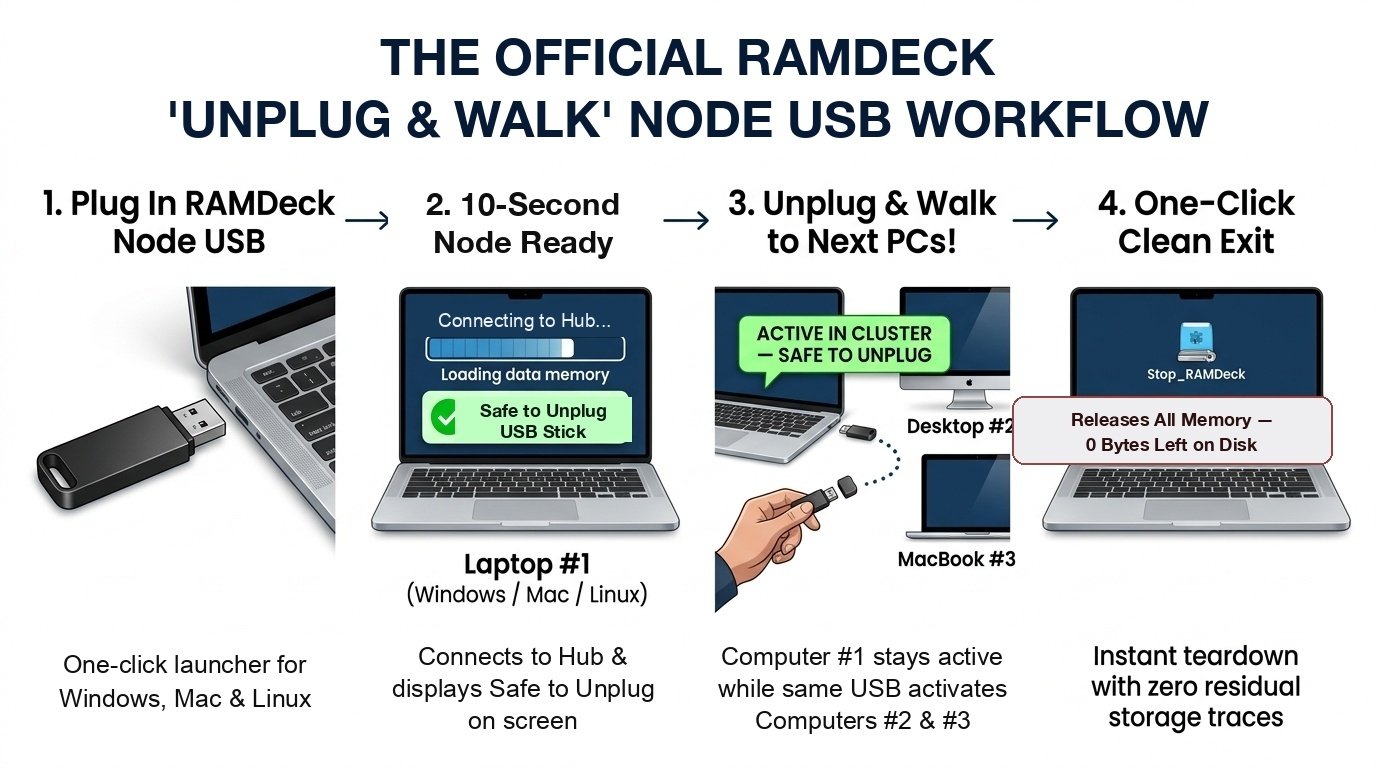
Every Official RAMDeck Node USB works out of the box across Windows 10/11, macOS, and Linux with zero installation and no administrator passwords required:
- One-click launchers for Windows, Mac, and Linux. Double-click the launcher for your computer’s operating system and enter your RAMDeck Hub’s LAN IP address.
- Built-in starter models. Includes ready-to-run starter models so newly connected computers can run offline AI immediately without needing an internet download.
- One-click stop and cleanup. Places a Stop_RAMDeck icon on the Desktop so you can stop sharing memory at any time with a single click.
The 60-Second “Unplug & Walk” Workflow
Unlike ordinary USB drives that must stay plugged into a single machine, one Official RAMDeck Node USB can activate your entire home or office:
- Plug in and launch (10 seconds). Insert the Official RAMDeck Node USB into Computer #1, double-click the launcher for Windows, Mac, or Linux, and enter your RAMDeck Hub’s LAN IP address.
- Wait for the Safe to Unplug message. Within seconds, the computer connects to your RAMDeck Hub and displays a [SAFE TO UNPLUG USB] message on screen.
- Unplug and walk to the next computer. Pull the physical USB stick out of Computer #1—even while an AI model is actively generating answers—walk over to Computer #2, plug the same USB stick in, and repeat.
You can watch the unedited video demonstrations of this workflow here:
- 60-Second Plug-and-Play USB Setup: youtu.be/ok3nYjxhc1w
- Live Mid-Generation USB Unplug Test: youtu.be/UwwMmqYk0ck
- Official RAMDeck Node USB Walkthrough: youtu.be/w5s8Ymdk7ls
Zero Disk Residue When You Click Stop
When the owner of a borrowed family laptop or office PC is finished contributing RAM to the cluster, they do not even need the USB stick back. They simply double-click the Stop_RAMDeck icon on their Desktop:
- The computer disconnects from the cluster and returns 100% of its memory to normal use.
- The Stop_RAMDeck icon removes itself cleanly—leaving 0 bytes of files and zero background programs on the computer’s hard drive.
Key Takeaways
- One USB stick activates an entire room. Plug in, wait a few seconds for the [SAFE TO UNPLUG USB] prompt, pull the USB stick out, and walk to the next computer.
- Zero disk residue. Clicking the Desktop Stop_RAMDeck icon releases all memory and cleans up completely without leaving files on the hard drive.
Pooling iPhones, iPads, and Android Phones
Look inside the pockets, bags, and nightstand drawers of almost any home or small office, and you will find some of the most power-efficient computers ever built: iPhones, iPads, and Android smartphones.
An iPhone 15 Pro or iPhone 16 carries an Apple Silicon processor with a hardware Metal GPU and 8 GB of fast Unified memory. A flagship Android phone—such as a Samsung Galaxy S24+, Google Pixel 8/9 Pro, or OnePlus 12/13—packs 12 GB to 16 GB of high-speed RAM while drawing less than 5 watts of power. Even a secondary 4 GB iPhone XS or 6 GB Android phone sitting in a drawer contains gigabytes of fast memory that is currently doing nothing.
Before RAMDeck (ramdeck.com), smartphone users faced a narrow ceiling: when a phone runs a standalone AI app by itself, mobile operating systems reserve a large share of memory for phone calls, notifications, and system stability—trapping standalone phone apps at tiny 1B to 4B models. Meanwhile, DIY command-line tools required complex developer setups on phones and had no official App Store or Google Play apps.
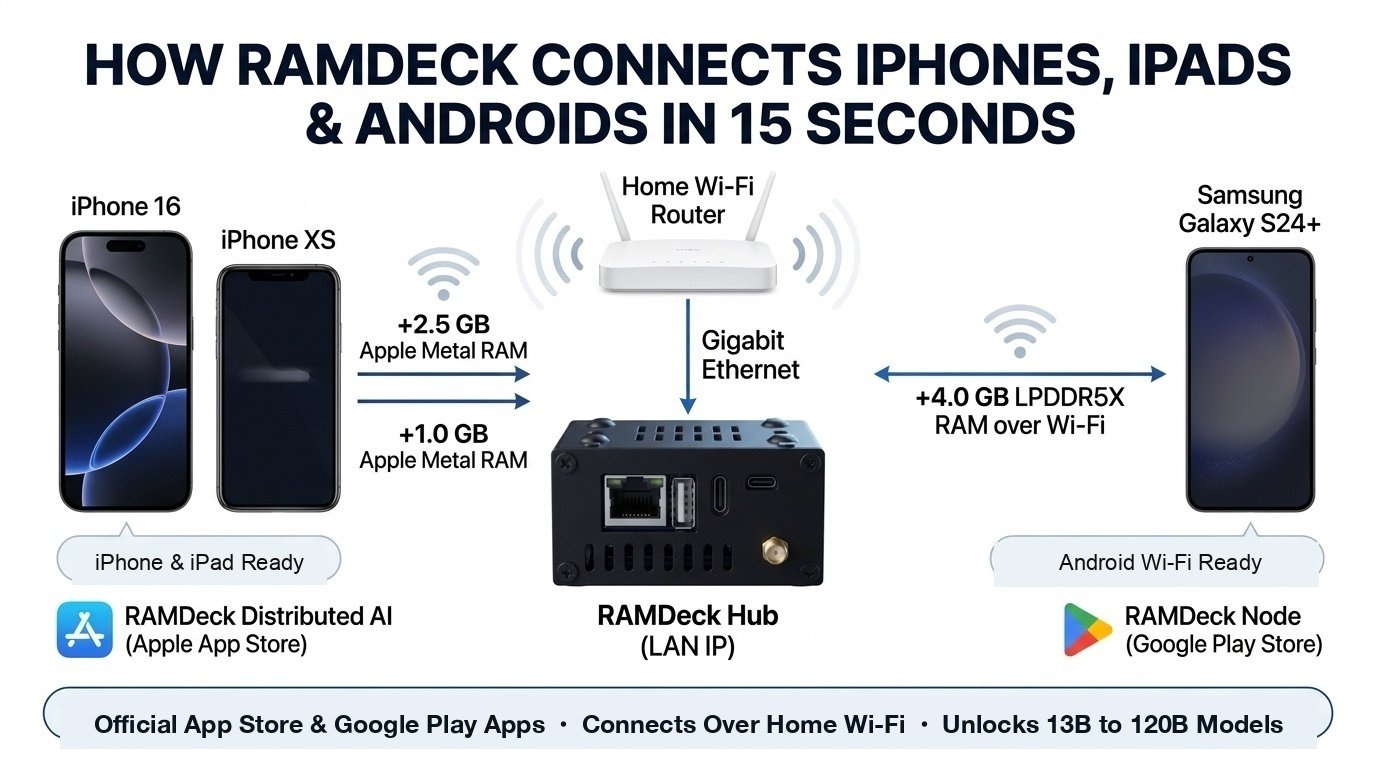
As the only distributed local AI ecosystem with official, production-approved node apps on both the Apple App Store and Google Play Store, RAMDeck lets any iPhone, iPad, or Android phone join your home or office cluster over Wi-Fi in 15 seconds—turning mobile RAM into the bridge that unlocks 13B, 27B, 30B MoE, 70B, and 120B models.
Why Mobile Pooling Unlocks Larger Models
Why can’t an 8 GB iPhone 16 or a 12 GB Samsung Galaxy S24+ run a 13B, 27B, or 30B model inside a standalone phone app?
Because mobile operating systems (iOS, iPadOS, and Android) reserve a substantial portion of a phone’s memory for phone calls, notifications, camera services, and system stability. If a standalone app on an 8 GB phone tries to load an 18 GB model by itself, it immediately runs out of memory.
Inside a RAMDeck cluster, your phone never has to hold the whole AI model by itself:
- Your 16 GB laptop holds roughly 14 GB of an 18 GB Qwen 30B MoE model, while your iPhone 16 contributes a safe 2.0 GB slice and your spare iPhone XS contributes a safe 1.0 GB slice via the RAMDeck Hub.
- Those 3.0 GB of pooled mobile RAM stay comfortably within safe mobile memory limits while lifting your laptop over the 18 GB threshold—delivering 28.0 tokens per second over standard home Wi-Fi (Watch Video).
Official App Store and Google Play Simplicity
Here is how RAMDeck’s official mobile apps compare against DIY workarounds and single-phone apps:
| Feature | Official RAMDeck Mobile Apps | DIY Command-Line Tools | Standalone Phone Apps |
|---|---|---|---|
| iPhone & iPad | Apple App Store Download | No official App Store app | App Store (Single phone only) |
| Android | Google Play Store Download | No official Google Play app | Google Play (Single phone only) |
| Joining Your Cluster | Open app, enter Hub LAN IP, tap Connect (15 seconds) | Manual terminal commands | Cannot pool memory with other devices |
| Experience | 100% plug-and-play with automatic memory safety | Built for programmers | Crashes on models above 4B |
| Models Unlocked | 13B, 27B, 30B MoE, 70B & 120B (Pooled via RAMDeck Hub) | Manual terminal setup | Limited to 1B – 4B models |
iPhone, iPad, and Android Memory Reference
Use the tables below to see the safe memory contribution of Apple and Android mobile devices when connected to your RAMDeck Hub:
Apple iPhone and iPad Reference
| Apple Device Tier | Physical Unified RAM | Standalone Limit | Pooled RAM Added | Verified Cluster Role |
|---|---|---|---|---|
| iPhone XS, XR, 11, 12, 13, SE | 4 GB | 1B – 1.5B only | +1.0 – 1.4 GB | Proven in the 28 tok/s Qwen 30B MoE test with M3 MacBook + iPhone 16 (Watch Video) |
| iPhone 12 Pro, 13 Pro, 14, 14 Pro, 15 | 6 GB | 1.5B – 3B only | +1.5 – 2.5 GB | Ideal Wi-Fi memory companion for 8 GB or 16 GB laptops |
| iPhone 15 Pro, iPhone 16 / Pro | 8 GB | 3B – 4B only | +2.0 – 3.5 GB | Proven at 28 tok/s on Qwen 30B MoE (Watch Video) and +3.2 GB in desktop + iPhone pooling (Watch Video) |
| iPad Air / iPad Pro (8 GB) | 8 GB | 3B – 4B only | +3.5 – 4.5 GB | Desktop-class M-series bandwidth at under 10W power |
| iPad Pro (16 GB Tier) | 16 GB | 7B – 8B | +8.0 – 9.5 GB | Contributes as much fast Unified RAM as a 16 GB MacBook |
Android Smartphone and Tablet Reference
| Android Device Tier | Physical RAM | Standalone Limit | Pooled RAM Added | Verified Cluster Role |
|---|---|---|---|---|
| Mid-Range / Spare Android Phones | 4 – 6 GB | 1B – 2B only | +1.0 – 2.0 GB | Zero-cost way to turn a spare phone into extra capacity |
| Mainstream Flagship Androids (Galaxy S23/S24+, Pixel 8/9, OnePlus) | 8 – 12 GB | 3B – 4B only | +2.5 – 5.0 GB | Proven on Samsung Galaxy S24+ running Qwen3.5 13B at 11–14 tok/s (Watch Video) and Qwen 3.8 27B at 1.92 tok/s (Watch Video) |
| High-RAM Flagship Androids (Galaxy Ultra, Pixel Pro, ROG Phone) | 16 – 24 GB | 4B – 8B | +6.0 – 10.5 GB | Contributes as much usable AI memory as a desktop PC |
Combining iPhone and Android Together
Normally, Apple iPhones and Android phones live in separate worlds and cannot combine their hardware resources.
When you plug the $199 RAMDeck Hub ($159 Indiegogo special through November 9, 2026) into your Wi-Fi router, the Hub acts as a universal bridge across platforms:
- Your iPhone or iPad connects to the Hub’s LAN IP address via the official RAMDeck Distributed AI app on the Apple App Store.
- Your Android phone connects to the same LAN IP address via the official RAMDeck Node app on the Google Play Store.
- Your Windows PC, Mac, and Linux machines connect to the same LAN IP address.
All five operating systems appear side by side on your RAMDeck dashboard as a single unified memory pool.
Key Takeaways
- Why standalone phone apps stop at 4B. Mobile operating systems reserve a large share of RAM for phone calls, notifications, and system stability.
- Why mobile pooling unlocks 30B–120B. Contributing a safe 1 GB to 6 GB+ slice from your phones bridges the exact memory gap a 16 GB laptop needs to load 18 GB+ models.
- Official App Store and Google Play apps. Download RAMDeck Distributed AI on the Apple App Store and RAMDeck Node on the Google Play Store, enter your Hub’s LAN IP address, and pool iOS and Android together in 15 seconds.
Five Verified Cluster Blueprints
Every benchmark in this book comes from live, unedited tests recorded on real consumer hardware connected to a RAMDeck Hub (ramdeck.com).
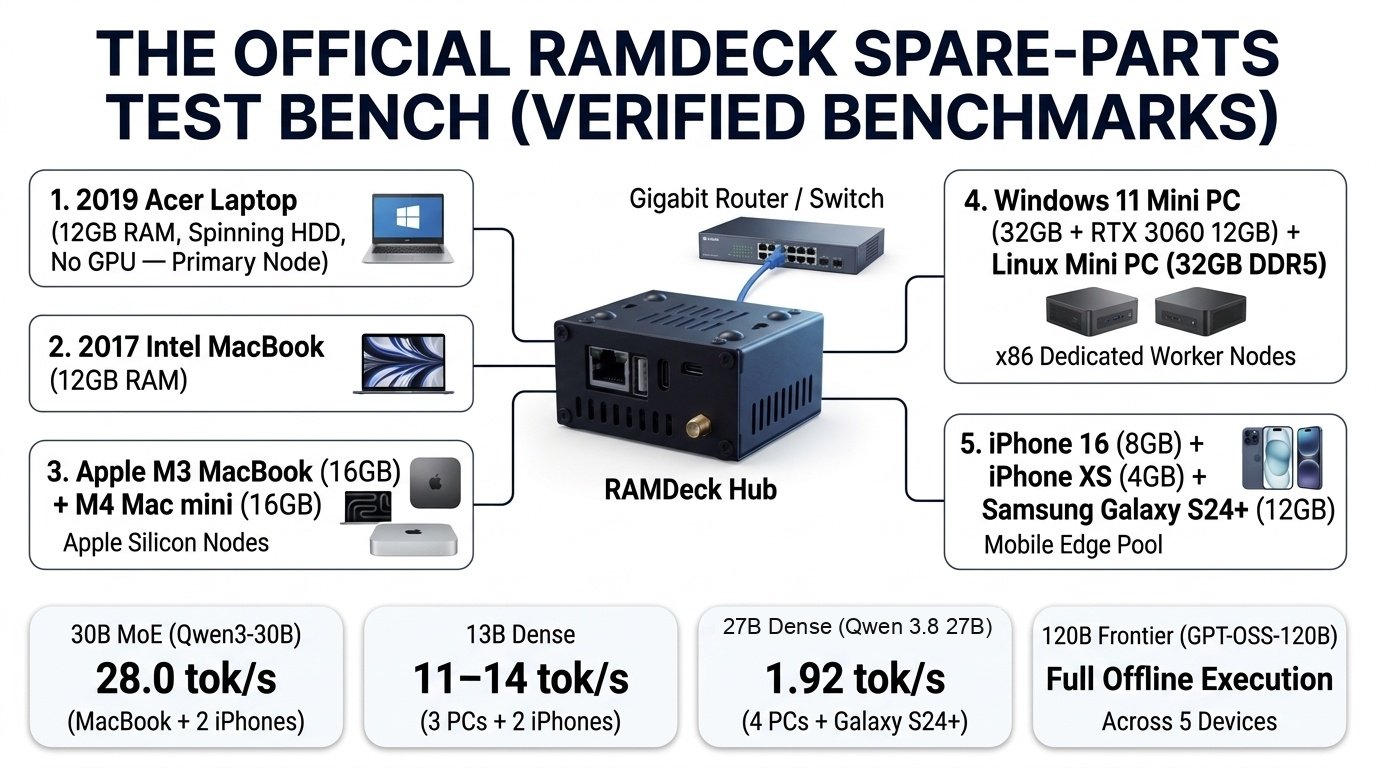
Rather than testing on $10,000 server rigs, we built our test bench out of modest, everyday devices—even using our weakest machine (a 2019 Acer Windows laptop with 12 GB of RAM, a spinning hard drive, and no GPU) as the primary computer in most runs to verify how RAMDeck performs on ordinary household hardware.
| Lab Device | Hardware Specifications |
|---|---|
| Acer Laptop (2019) | 12 GB RAM, spinning mechanical HDD, no GPU (Used as Primary Node in most runs) |
| MacBook (Intel, 2017) | 12 GB RAM (Secondary Intel laptop given a second life) |
| MacBook (Apple M3) | Apple M3, 16 GB Unified RAM |
| Mac mini (Apple M4) | Apple M4, 16 GB Unified RAM |
| Windows 11 Mini PC | Beelink SER5 Max, 32 GB RAM + NVIDIA RTX 3060 (12 GB VRAM) |
| Linux Mini PC | AMD Ryzen 7 6800H, Ubuntu 24.04, 32 GB DDR5 RAM (Contributing ~28 GB) |
| iPhone 16 | Apple A18, 8 GB Unified RAM (Contributing ~2.0–3.2 GB via App Store app) |
| iPhone XS (2018) | Apple A12, 4 GB RAM (Contributing ~1.0 GB via App Store app) |
| Android Phone | Samsung Galaxy S24+ (12 GB RAM, connected via Google Play app) |
Each of the five blueprints below uses a combination of these consumer devices.
Blueprint 1: The 30B MoE Speed Cluster (28 to 39 Tokens/Sec)
Suppose you own a 16 GB Apple Silicon MacBook plus two iPhones (your daily iPhone 16 and a spare 4 GB iPhone XS from a desk drawer), and you want to run a 30-billion-parameter Mixture-of-Experts model (Qwen 30B A3B, ~18 GB in Q4_K_M) for fast coding and daily reasoning. Alone, your 16 GB MacBook is several gigabytes short and cannot load the 18 GB model.
| Role | Device | Operating System | Connection Method | Pooled Memory |
|---|---|---|---|---|
| Cluster Brain | RAMDeck Hub ($199 Retail / $159 Indiegogo Special) | RAMDeck Appliance | Ethernet to Home Router | Dedicated 24/7 Coordinator |
| Node 1 (Primary) | M3 MacBook (16 GB Unified RAM) | macOS | Native macOS Node / Node USB | ~14.0 GB Unified RAM |
| Node 2 (Wireless) | iPhone 16 (8 GB Unified RAM) | iOS | Apple App Store App | ~2.0 GB Metal RAM |
| Node 3 (Wireless) | iPhone XS (4 GB Unified RAM) | iOS | Apple App Store App | ~1.0 GB Metal RAM |
- Model loaded: Qwen 30B MoE (~18 GB Sparse MoE, 30B total parameters, 3B active per token).
- Verified speed: 28.0 tokens per second over standard home Wi-Fi (loading in under 30 seconds). When pooling the RTX 3060 Mini PC and M4 Mac mini on Qwen3-Coder 30B (A3B), throughput reaches 38 to 39 tokens per second.
- Video proofs: MacBook + 2 iPhones at 28 tok/s and Mini PC + Mac mini at 39 tok/s.
Blueprint 2: The Cross-Platform 13B Dense Workhorse (11 to 19 Tokens/Sec)
Suppose you have three everyday computers—our 2019 Acer laptop, Windows Mini PC, and M4 Mac mini—plus a Samsung Galaxy S24+ Android smartphone, and you want to run a 13-billion-parameter Dense model (Qwen3.5 13B) smoothly while leaving plenty of free RAM on every machine for daily work.
- Pooled devices: Acer Laptop (2019, 12 GB) + Windows Mini PC + M4 Mac mini, plus Samsung Galaxy S24+ via the Google Play Store app.
- Model loaded: Qwen3.5 13B Dense (Q4_K_M).
- Verified speed: 11 to 19 tokens per second across the three computers (Video), and 11 to 14 tokens per second with the Samsung Galaxy S24+ phone included over Wi-Fi (Video).
Blueprint 3: The Mixed PC, Mac, and Android 27B Dense Cluster (1.92 Tokens/Sec)
Suppose you want to run a heavy 27-billion-parameter Dense model (Qwen 3.8 27B, ~16–17 GB footprint)—where all 27 billion parameters fire on every token—across Windows PCs, a Mac, and an Android smartphone, even with the 2019 Acer laptop (no GPU) in the primary seat.
| Role | Device | Operating System | Connection Method | Role in Cluster |
|---|---|---|---|---|
| Cluster Brain | RAMDeck Hub | RAMDeck Appliance | Ethernet to Home Router | Automatic Coordination |
| Nodes 1–3 | Acer Laptop (2019) + Windows Mini PC + M4 Mac mini | Windows & macOS | Node Agent / Node USB | Primary & Secondary Layer Holders |
| Node 4 (Mobile) | Samsung Galaxy S24+ (12 GB RAM) | Android | Google Play Store App | Wireless Mobile Memory Donor |
- Model loaded: Qwen 3.8 27B (27B Dense model, ~16–17 GB footprint).
- Verified speed: 1.92 tokens per second across 4 devices with zero SSD swap (Watch Video).
Blueprint 4: The 120-Billion-Parameter Home Cluster (1.37 to 3.1 Tokens/Sec)
Running a 120-billion-parameter model (requiring 60+ GB of RAM) used to require cloud servers or $4,000+ workstations. Here are two verified 120B configurations on consumer hardware:
- 5-Computer Multi-OS Cluster (Windows + macOS + Ubuntu Linux at 3.1 tok/s). Pooling 2 Apple Silicon Macs (M4 Mac mini + M3 MacBook), 2 Windows PCs (Mini PC + 2019 Acer Laptop), and 1 Ubuntu Linux Mini PC (~111 GB physical RAM, ~92 GB usable) loaded the 60+ GB 120B model and generated continuous output at 3.1 tokens per second (Watch Video).
- 6-Device Household + Mobile Pool (gpt-oss 120B at 1.37 tok/s). Pooling the Acer Laptop, M4 Mac mini, M3 MacBook, 2017 Intel MacBook, Windows Mini PC, and Samsung Galaxy S24+ (5 devices holding active layers) ran gpt-oss 120B continuously at 1.37 tokens per second, including a 40-hour continuous stability test (Watch Video and 40-Hour Test).
Blueprint 5: The Zero-Install Office and Law Firm Cluster
A law firm, medical clinic, accounting office, or engineering team has 3 to 5 standard Windows, Mac, and Linux workstations. They need 30B to 70B local AI to analyze confidential client PDFs with 100% air-gapped privacy and zero permanent software installed on employee hard drives.
- Connect the Hub. Plug the RAMDeck Hub into the office router via Ethernet.
- Walk desk-to-desk with one Node USB. Insert the Official RAMDeck Node USB into Office PC #1, launch the starter, enter the Hub’s LAN IP, wait ~10 seconds for the [SAFE TO UNPLUG USB] message, unplug the USB drive, and walk to Desk #2, Desk #3, and Desk #4.
- Run confidential multi-user AI. In our live Law Firm demonstration, three employees on three separate devices (two MacBooks and an Android phone) simultaneously queried 13 confidential legal PDFs against a 30B model running at 38 to 39 tokens per second with exact document citations—100% offline. When finished, clicking Stop_RAMDeck on any USB-activated desktop leaves 0 bytes on the office hard drive (Law Firm Demo, Mid-Generation USB Unplug Test).
Summary of Blueprints
| Blueprint | Model Verified | Devices Pooled via RAMDeck Hub | Verified Speed | Video Proof |
|---|---|---|---|---|
| 1. 30B MoE Speed Cluster | Qwen 30B / Qwen3-Coder 30B | M3 MacBook + iPhone 16 + iPhone XS (or Mini PC + Mac mini) | 28.0 – 39.0 tok/s | youtu.be/8q1ZocOugv4 |
| 2. 13B Dense Workhorse | Qwen3.5 13B | Acer Laptop + Mini PC + Mac mini (+ Galaxy S24+) | 11 – 19 tok/s | youtu.be/jMgo6vN1mFY |
| 3. 27B Dense Deep Reasoning | Qwen 3.8 27B | Acer Laptop + Mini PC + Mac mini + Galaxy S24+ | 1.92 tok/s | youtu.be/Syfa2G_luX4 |
| 4. 120B Frontier Cluster | gpt-oss 120B (60+ GB) | 2 Macs + 2 Windows PCs + 1 Linux PC (or 6-Device Pool) | 1.37 – 3.1 tok/s | youtu.be/uASAPjAEuI4 |
| 5. Zero-Install Office Cluster | 30B–70B+ Models + PDFs | 3–5 Office PCs/Macs via 1 Node USB | Zero Disk Residue | youtu.be/UwwMmqYk0ck |
Household Audit, Playbooks, and Quick-Start Guide
Throughout this book, we have seen how RAMDeck (ramdeck.com) turns local artificial intelligence from an expensive single-workstation purchase into a practical utility for any home or office.
By combining a dedicated $199 hardware hub ($159 Indiegogo special through November 9, 2026) with the Official RAMDeck Node USB ($29 value, included free during the campaign) and official Apple App Store and Google Play Store mobile apps, any household, student dorm, clinic, or office can pool 30 GB to 100 GB+ of memory in 60 seconds.
This closing chapter provides four practical playbooks, a 5-minute household memory audit worksheet, and the 60-second setup checklist.
Four Practical Playbooks
Software Engineers and App Builders
- The challenge. Cloud coding APIs charge recurring monthly fees and send your codebase to external servers, while a single 16 GB laptop crashes when you try to load a 30B coding model locally.
- Your setup. Plug the RAMDeck Hub into your router and pool your 16 GB primary laptop with a secondary desktop/laptop or two phones (~20 GB+ pooled RAM) running Qwen3-Coder 30B (A3B) or Qwen 30B MoE.
- The result. You get 30B-tier code generation, refactoring, and debugging at 28 to 39 tokens per second (Video) with complete local privacy, an OpenAI-compatible local API endpoint (/v1/chat/completions for tools like Continue.dev or Cline), and zero API bills.
Medical Clinics, Law Firms, and Financial Advisors
- The challenge. Client-confidentiality rules (HIPAA, attorney-client privilege, non-disclosure agreements) forbid uploading patient charts, contracts, or tax filings to cloud AI providers—and office IT policies often restrict installing permanent software on staff computers.
- Your setup. Connect the RAMDeck Hub to the office router and walk desk-to-desk with a single Official RAMDeck Node USB to pool 3 to 5 office PCs or Macs (32 GB to 64 GB+ pooled RAM) with private PDF Knowledge Base citations (Law Firm Demo).
- The result. Air-gapped document analysis that stays inside your building—and leaves 0 bytes on office hard drives when Stop_RAMDeck is clicked.
Students, Educators, and Labs
- The challenge. Students and researchers want hands-on experience running 27B, 30B, 40B, 70B, and 120B open-weight models without paying cloud GPU rental fees or buying $3,000 lab servers.
- Your setup. Use a single RAMDeck Hub to pool classroom or dorm laptops, iPads, iPhones, and Android phones into a shared AI cluster.
Families and Eco-Conscious Hardware Reusers
- The challenge. You want a private, subscription-free AI assistant for your household while keeping the secondary laptops and smartphones in your drawers out of the landfill.
- Your setup. Leave the RAMDeck Hub plugged into your home Wi-Fi router 24/7 alongside your spare laptops and drawer phones, giving every browser in the house instant access via your Hub’s local LAN IP address (for example, http://192.168.1.50:8420).
Your 5-Minute Household Audit Worksheet
List the computers, tablets, and phones in your home or office to see the total pooled memory waiting to be unlocked:
| Device & Operating System (Windows / macOS / Linux / iOS / Android) | Physical RAM + VRAM | Usable AI Contribution (Reported on Dashboard) | Connection Method (Node USB, Installer, App Store, Google Play) |
|---|---|---|---|
| 1. Primary Computer | ____ GB | ____ GB | Node USB or Installer |
| 2. Secondary Desktop / Laptop | ____ GB | ____ GB | Node USB (“Unplug & Walk”) |
| 3. Spare / Closet Computer | ____ GB | ____ GB | Node USB (“Unplug & Walk”) |
| 4. Primary Phone (iOS / Android) | ____ GB | ____ GB | App Store / Google Play App |
| 5. Secondary Phone / Tablet | ____ GB | ____ GB | App Store / Google Play App |
| 6. Additional Device | ____ GB | ____ GB | Node USB or Mobile App |
| Total Pooled Capacity | ____ GB Physical | ____ GB Usable AI RAM | Unified at RAMDeck Hub LAN IP |
The 60-Second Quick-Start Checklist
- Plug the RAMDeck Hub into your router (15 seconds). Connect the RAMDeck Hub to any Ethernet LAN port on your home or office router and plug in its USB-C power cable. Note your Hub’s local LAN IP address (such as 192.168.1.50).
- Activate your Windows, Mac, and Linux computers (60 seconds per PC). Insert the Official RAMDeck Node USB into Computer #1, open the launcher for your operating system, and enter your Hub’s LAN IP address. As soon as the screen displays [SAFE TO UNPLUG USB], pull the USB drive out and walk to Computer #2 (or install the permanent Node Agent from ramdeck.com/downloads).
- Activate your iPhones, iPads, and Android phones (15 seconds per phone). On iPhone or iPad, download RAMDeck Distributed AI from the Apple App Store. On Android, download RAMDeck Node from the Google Play Store. Enter your Hub’s LAN IP address and tap Connect.
- Open your dashboard and run local AI. Open any browser on your network and visit your Hub’s local address (such as http://192.168.1.50:8420). Select your model and generate responses 100% offline.
Official Links and Resources
- Official Website & Guides: ramdeck.com
- Official Book & Companion Videos: ramdeck.com/book
- Indiegogo Campaign ($159 Special + Free Node USB through Nov 9, 2026): indiegogo.com/en/projects/trademav/ramdeck-pool-your-ram-run-bigger-ai
- Desktop Node Downloads (Windows, macOS, Linux): ramdeck.com/downloads
- Apple App Store (iPhone & iPad): apps.apple.com/us/app/ramdeck-distributed-ai/id6825166226
- Google Play Store (Android): play.google.com/store/apps/details?id=com.ramdeck.androidnode
- Video Benchmarks & Demos: ramdeck.com/blog
About the Authors
The TradeMAV Team is the hardware and distributed systems engineering group behind RAMDeck (ramdeck.com). Founded on the conviction that everyday people, students, clinics, and small businesses shouldn’t have to rent cloud AI or buy $3,000 workstations when they already own dozens of gigabytes of idle memory across their computers and phones, TradeMAV builds plug-and-play appliances that make local AI accessible to everyone.
Reference Tables and Glossary
This reference section provides four lookup tables and guides for sizing and operating your RAMDeck cluster (ramdeck.com).
Appendix A: Model Memory Requirements
Use this matrix when selecting an open-weight GGUF model to match its size and compression level against your cluster’s total usable pooled RAM (including a standard 8,192-token conversation context window):
| Open-Weight Model Family | Architecture | Q4_K_M File / Total RAM | Q5_K_M File / Total RAM | Q8_0 File / Total RAM | Verified RAMDeck Topology & Speed |
|---|---|---|---|---|---|
| Llama-3.2-3B / Qwen2.5-3B | Dense (3B Active) | 2.0 GB / 3.2 GB | 2.4 GB / 3.6 GB | 3.4 GB / 4.6 GB | Fits on 1 laptop or 1 flagship phone |
| Qwen2.5-Coder-7B / Llama-3.1-8B | Dense (7B–8B Active) | 4.9 GB / 6.8 GB | 5.7 GB / 7.6 GB | 8.5 GB / 10.5 GB | Verified 43–44 tok/s across Acer + Mini PC + Mac (Video) |
| Qwen3.5-13B / Phi-4-14B | Dense (13B–14B Active) | 8.5–9.0 GB / 11.5 GB | 10.5 GB / 13.0 GB | 15.0 GB / 18.0 GB | Verified 11–19 tok/s across Acer + Mini PC + Mac mini (+ S24+) (Video) |
| Qwen 3.8 27B / Gemma-3-27B | Dense (27B Active) | 16.8 GB / 19.5 GB | 19.8 GB / 22.5 GB | 28.5 GB / 31.5 GB | Verified 1.92 tok/s across Acer + Mini PC + Mac mini + Galaxy S24+ (Video) |
| Qwen 30B / Qwen3-Coder 30B (A3B) | Sparse MoE (30B / 3B Active) | 17.5 GB / 20.5 GB | 21.3 GB / 24.0 GB | 31.8 GB / 34.5 GB | Verified 28.0 tok/s (MacBook + 2 iPhones, Video) & 38–39 tok/s (Mini PC + Mac mini, Video) |
| Qwen 35B / DeepSeek-R1-32B | MoE / Dense (32B–35B) | 19.8 GB / 23.0 GB | 26.0 GB / 29.0 GB | 34.8 GB / 38.0 GB | Verified ~29 tok/s across Mini PC + M4 Mac mini (Video) |
| Qwen3-Coder-Next REAP 40B | Sparse MoE (40B / 3B Active) | 25.0 GB / 28.5 GB | 29.5 GB / 33.0 GB | 42.0 GB / 46.0 GB | Verified 16.0 tok/s across Mini PC + Mac mini + Acer (Video) |
| Llama-3.3-70B / Qwen2.5-72B | Dense (70B–72B Active) | 42.5 GB / 47.5 GB | 50.0 GB / 55.0 GB | 75.0 GB / 80.0 GB | 3–4x 16–32 GB PCs/Macs + 1–2 Phones |
| gpt-oss 120B / 120B Multi-OS | Frontier MoE (120B Total) | 64.0 GB / 72.0 GB | 82.0 GB / 90.0 GB | 125+ GB / 135+ GB | Verified 3.1 tok/s across 5 PCs (Video) & 1.37 tok/s (Video) |
Appendix B: Hardware Memory Reference
| Hardware Class | Memory Type | Practical Memory Speed | System Reserve | Typical Usable AI RAM Contributed |
|---|---|---|---|---|
| Secondary Laptop / Desktop (DDR4) | System DDR4 RAM | ~20 – 40 GB/s | 3.5 – 5.0 GB | ~4.5 GB (8GB) / ~7.5 GB (12GB) / ~11.0 GB (16GB) / ~26.0 GB (32GB) |
| Modern Laptop / Desktop (DDR5) | System DDR5 RAM | ~60 – 85 GB/s | 4.0 – 5.5 GB | ~4.5 GB (8GB) / ~11.0 GB (16GB) / ~26–28 GB (32GB) |
| Apple Silicon Base (M1, M2, M3, M4) | Unified Memory | ~68 – 120 GB/s | Safe macOS Reserve | ~4.5 GB (8GB) / ~10.5–14.0 GB (16GB) / ~16.5 GB (24GB) |
| Apple Silicon Pro / Max (M1–M4 Pro/Max) | Unified Memory | ~200 – 546 GB/s | Safe macOS Reserve | ~11.0 GB (18GB) / ~23.0 GB (36GB) / ~32.0 GB (48GB) |
| NVIDIA GeForce RTX (3060 / 4060 / 4070 / 4080 / 4090) | Dedicated GPU VRAM | ~270 – 1,008 GB/s | Display Reserve | ~7.0 GB (8GB) / ~11–12 GB (12GB) / ~14.5 GB (16GB) / ~22.5 GB (24GB) |
| Apple iPhone (iPhone XS to iPhone 16 Pro) | Mobile Unified RAM | ~34 – 68 GB/s | Safe iOS Reserve | ~1.0 GB (4GB) / ~1.8 GB (6GB) / ~2.0–3.5 GB (8GB) |
| Android Flagship (Galaxy S24+, Ultra, Pixel, OnePlus) | Mobile LPDDR5/5X RAM | ~50 – 85 GB/s | Safe Android Reserve | ~2.5–3.5 GB (8GB) / ~4.0–5.0 GB (12GB) / ~6.5–8.0 GB (16GB) |
Appendix C: Home Network Guide
- Plug your RAMDeck Hub directly into your router via Ethernet. Connecting the Hub to your router’s LAN port with the included Ethernet cable gives your cluster a stable wired anchor.
- Connect laptops and phones to 5 GHz or 6 GHz Wi-Fi. Use 5 GHz or 6 GHz Wi-Fi bands (Wi-Fi 5, Wi-Fi 6, or Wi-Fi 6E) instead of older 2.4 GHz Wi-Fi for the lowest wireless latency across rooms.
- Use your main private network rather than Guest Wi-Fi. Guest Wi-Fi networks often block devices from talking to each other on the local network. Connect all devices to your primary home or office network so they can reach your Hub’s LAN IP address.
- Optional: reserve your Hub’s IP address in your router. Setting a reserved IP address for your RAMDeck Hub in your router settings keeps its local LAN IP address (such as 192.168.1.50) permanent across power outages.
Appendix D: Glossary
- Context Window (KV Cache). The active working-memory buffer that stores your conversation history and pasted documents in RAM while you chat with an AI model.
- CUDA. NVIDIA’s GPU computing platform supported automatically by RAMDeck on Windows and Linux PCs with GeForce GTX and RTX graphics cards.
- Dense Model. A traditional neural network (such as Qwen2.5-Coder 7B, Qwen3.5 13B, or Qwen 3.8 27B) in which 100% of parameters fire on every generated word.
- E-Waste Prevention. Giving secondary laptops, desktops, and smartphones a productive second life by pooling their memory with RAMDeck instead of discarding them when single-device AI models outgrow their soldered RAM.
- GGUF. The standard compressed open-weight model file format supported natively by RAMDeck.
- HBM (High-Bandwidth Memory). Enterprise stacked memory whose massive data-center demand contributed to the 2026–2027 consumer DDR5 and GPU price surge.
- LAN IP Address. The local network IP address of your RAMDeck Hub (such as 192.168.1.50) used by all Windows, Mac, Linux, iOS, and Android nodes to connect offline over your router.
- Memory Wall. The physical requirement that 100% of active model weights and conversation context must fit inside physical RAM or VRAM simultaneously.
- Metal. Apple’s hardware GPU acceleration engine used automatically by RAMDeck on Macs, iPhones, and iPads.
- Mixture-of-Experts (MoE). A modern AI architecture (such as Qwen 30B A3B, Qwen3-Coder 30B, Qwen3-Coder-Next 40B, or gpt-oss 120B) that stores large total knowledge in pooled RAM while activating only a small fraction of specialist parameters per word, achieving 28 to 39 tokens per second across pooled household devices.
- Network RAM Pooling. Combining the idle RAM and VRAM of multiple computers and phones over a local router to run large AI models (13B–120B+) locally.
- Official RAMDeck Node USB (“Unplug & Walk”). The zero-install tri-OS (Windows, macOS, Linux) USB accessory ($29 value; included free with the $159 Indiegogo special through Nov 9, 2026) that lets one USB drive activate multiple computers sequentially in 60 seconds with 0 bytes left behind on disk when stopped.
- Quantization (Q4_K_M, Q5_K_M, Q8_0). Compression of 16-bit model weights into 4-bit, 5-bit, or 8-bit formats to reduce RAM requirements by 60% to 75% while retaining over 99% accuracy.
- RAMDeck Distributed AI Memory Hub. The plug-and-play hardware appliance ($199 retail; $159 Indiegogo special through November 9, 2026) created by the TradeMAV team (ramdeck.com) that plugs into a home or office router via Ethernet to pool RAM and VRAM across Windows, macOS, Linux, iOS, and Android.
Ready to Pool the RAM You Already Own?
Get the plug-and-play RAMDeck Hardware Hub on Indiegogo ($159 launch special through November 9, 2026) and receive 1 Official RAMDeck Node USB ($29 value) FREE.
Back RAMDeck on Indiegogo ($159 + Free $29 USB)